Transform Your Job Search: The Power of a Job Application Tracker Tool for Google Sheets
Searching for a new role can feel overwhelming. Whether you are navigating a career change in the New Year, celebrating a recent graduation, or quietly stepping away from a role that no longer serves you, the process demands organization, clarity, and persistence. A Job Application Tracker Tool I Google can be the anchor you need in this storm. With a free, customizable template built for Google Sheets, you can move from a chaotic pile of scattered notes to a streamlined, data-driven job search.
This tool is not just about storing job titles and company names. It is about giving you a strategic advantage. By centralizing every application, interview stage, and keyword, you reduce cognitive load and free up mental energy for what truly matters — preparing for interviews and making informed decisions. Let’s explore how this template works and why it might be the most practical asset in your job hunt this year.
Why Your Job Search Needs a Dedicated Tracker
Many job seekers rely on memory or email folders to track their progress. This approach quickly breaks down when you are managing ten, twenty, or fifty applications simultaneously. You forget which company uses which applicant tracking system. You lose the link to the job description. You struggle to remember whether you already followed up with a recruiter. A Job Application Tracker Tool for Google Sheets eliminates these pain points by providing a single source of truth.
This is especially relevant in 2025, when the job market continues to shift. Whether you are leaving a position due to quiet quitting — choosing to disengage rather than resign — or you are a recent graduate entering the workforce for the first time, you need a system that adapts to your pace. The tracker scales with you. It accommodates rapid-fire applications during a New Year push and supports methodical, targeted searching over several months.
From Chaos to Clarity with Collapsible Sections and Colour-Coded Rows
Spreadsheets can become unwieldy when they grow. This template solves that problem with collapsible sections. You can hide completed applications, focus on active ones, and keep your workspace clean without losing any data. When you update the current status to either "Offered" or "Accepted," the entire row changes colour. This visual cue cuts through the noise instantly. You no longer have to scan columns of text to find your wins — they stand out at a glance.
This design choice is not just aesthetic. It is a psychological boost. Seeing a row turn green when an offer comes in reinforces your progress. It reminds you that your efforts are yielding results, which is crucial during a process that can feel repetitive and disheartening.
What You Get Inside the Job Application Tracker Template
The template is delivered as a digital download via a PDF that contains a direct link to the Google Sheet. You will need a free Google account to use it. Once opened, you can access it from any device, including your mobile phone using the Google Sheets app. This means you can update your application status on the go — right after a networking event, during a commute, or before an interview.
Here is a breakdown of what is included:
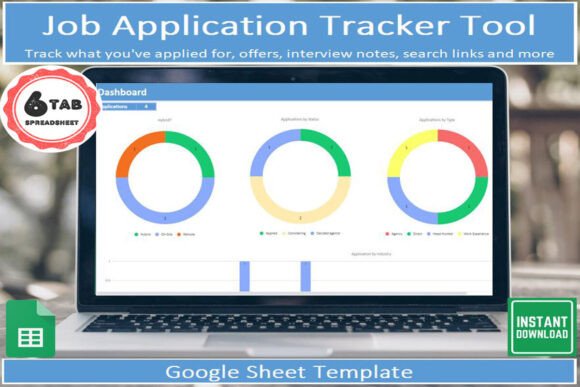
- A dashboard of visual insights: Charts and summaries show you where you stand. How many applications have you sent? How many interviews are pending? What is your offer rate? This dashboard turns raw data into actionable intelligence.
- Drop-down lists for categorization: Speed up data entry with predefined options for job type, source, industry, and status. Consistency in categorization makes filtering and analysis effortless.
- Collapsible sections: Keep your sheet organized without losing depth. Expand sections only when you need them.
- Colour-changing rows: Instant visual feedback when an application reaches "Offered" or "Accepted" status.
- An application tab with up to 8 interview stages: Track every step of the interview process, from initial screening to final rounds, plus the entire offer negotiation process.
- A keyword tab: Save the terms you use to search job boards and company recruitment pages. This helps you refine your strategy and identify which keywords attract the best results.
You are not just getting a place to store data. You are getting a system that encourages active reflection. By tracking which keywords yield interviews, you can double down on what works. By monitoring your interview stages, you can identify patterns — perhaps you consistently advance to round three but stall there. This insight is gold.
How to Make the Most of the Keyword Tab
One of the most overlooked aspects of a job search is the language you use to find opportunities. The keyword tab in this Job Application Tracker Tool I Google allows you to log the search terms you use across job boards, LinkedIn, and company career pages. Over time, you will see which terms return the most relevant positions. For example, "product marketing manager" might bring up too many senior roles, while "growth marketing specialist" yields a better fit for your experience level.
You can also track which keywords appear frequently in job descriptions that interest you. This informs your resume and cover letter language. If you notice that "agile project management" appears in most roles you apply for, you can emphasize that skill in your application materials.
The New Year Push: Starting Fresh with Structure
January is a natural time to reset. The phrase "New Year New Job" is not just a hashtag — it is a real momentum shift. Companies are hiring, budgets are refreshed, and recruiters are actively searching. This is the perfect moment to adopt a Job Application Tracker Tool for Google Sheets. Starting with structure from day one prevents the messy sprawl that derails many job seekers by February.
Begin by entering every application as you submit it. Use the drop-down lists to categorize quickly. Set aside ten minutes each evening to update statuses based on emails received that day. Over the weekend, review your dashboard. Which sources are generating the most interviews? Are you spending too much time on low-conversion boards? The data will guide your decisions.
Graduation: Transitioning from Academia to the Workforce
Recent graduates face a unique challenge. You may have limited professional experience but high motivation. The job application tracker helps you emphasize quality over quantity. You can track each application with notes on how you tailored your resume, which networking contacts you engaged, and what follow-up actions you took.
The interview stage tab is particularly valuable here. As a graduate, you might be new to multi-round interviews. Tracking up to eight stages helps you prepare for each phase — phone screen, technical assessment, case study, panel interview, and final meeting with leadership. You can note questions asked, topics covered, and areas for improvement. Over time, you build a personal playbook for interviews.
The dashboard also provides a sense of accomplishment. When you see your applications progress from "Applied" to "Interview Scheduled" to "Offer," you gain confidence. Each win, large or small, is visible.
Quiet Quitting and the Intentional Job Search
Quiet quitting — doing the minimum required at work without emotional investment — often stems from burnout or misalignment. If you are in this situation, your job search needs to be strategic and efficient. You do not have the energy for a scatter-shot approach. A tracker helps you focus your limited bandwidth on high-potential opportunities.
Use the keyword tab to identify roles that genuinely align with your values. Track the company culture aspects that matter to you — remote flexibility, growth opportunities, leadership style. When you receive an offer, the data you have gathered across the sheet will help you make a confident decision. You are not just escaping a bad situation. You are moving toward a better fit.
This intentionality is what sets the tracker apart from a simple list. It forces you to ask: Why am I applying here? What stage am I at? What do I need to prepare next? These questions turn a passive activity into an active strategy.
Practical Benefits of a Mobile-Enabled Tracker
Because this template lives in Google Sheets, you can access it from your phone. This is not a luxury — it is a necessity. You might receive an interview invitation while commuting. Open the sheet, update the status, and note the date. You might meet a recruiter at a networking event and want to log a connection immediately. The mobile app makes this frictionless.
No need to carry a notebook or remember details until you get home. The tracker becomes your external brain. This reduces anxiety and ensures accuracy. Small data points — like the name of the person you spoke with or the specific role discussed — are captured instantly.
Tackling Difficult Interview Questions with Confidence
One hidden feature of this tracker is how it helps you prepare for interviews. By storing notes on each application and interview stage, you create a history of questions and your responses. Before a second-round interview, review the notes from the first round. What did the interviewer focus on? What questions caught you off guard? Use this information to refine your answers.
You can also use the keyword tab to identify themes across your applications. If every role you apply for asks about "cross-functional collaboration," you can craft a story that demonstrates this skill proactively. The tracker turns your job search into a learning loop. Each application teaches you something, and you retain that knowledge because you record it.
Getting Started with Your Download
Accessing the tool is simple. The digital download comes as a PDF containing a link to the Google Sheet. You also receive a set of instructions explaining every element and how to use it. The instructions are clear and practical — no fluff, just actionable guidance.
After you open the sheet, take twenty minutes to explore it. Fill in a few sample entries. Test the drop-down lists. Collapse a section. Watch how the row colour changes when you flip a status to "Offered." This hands-on exploration will help you internalize the tool's logic.
Then, start your real entries. Commit to updating the sheet daily. Within two weeks, you will have enough data to make your dashboard meaningful. Within a month, you will see patterns that inform your strategy.
Final Observations on the Job Search Journey
A job search is rarely linear. There are periods of waiting, moments of excitement, and occasional setbacks. A tracker does not eliminate these highs and lows, but it provides a framework that keeps you grounded. It reminds you of the progress you have made, even on days when the inbox is quiet.
Whether you are chasing a New Year reset, launching your career after graduation, or redefining your path after quiet quitting, the right tools make the difference. A Job Application Tracker Tool I Google gives you structure, insight, and control. It transforms a stressful process into a manageable, strategic project.
Download the template, open it on your phone, and start building your path forward. The next opportunity is out there — and now you have the system to find it.