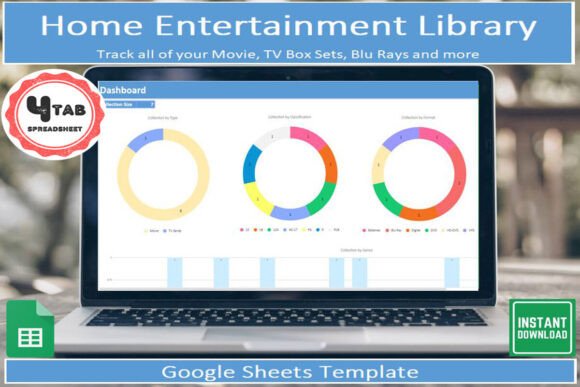
Home Entertainment Tracker Library: A Practical Tool for Managing Your Collection
If you’ve been collecting movies, TV shows, or special edition releases for years, you know how fast a small shelf can turn into a room full of media. DVDs, Blu-rays, VHS tapes, LaserDiscs—each format adds something different, and before you know it, you’re struggling to remember what you already own, what you’ve been meaning to watch, or whether you already picked up that limited edition box set. That’s where the Home Entertainment Tracker Library comes in. It’s a Google Sheets template built to help you track every item in your collection with minimal fuss and maximum clarity.
I’ve been using this template myself, and after thirty years of accumulating physical media, it’s been genuinely eye-opening to see the full scope of what I’ve gathered. It’s not just about counting titles—it’s about understanding the shape of your collection, spotting gaps, and finally having a tool that makes updating your library feel natural rather than like busywork.
What Is the Home Entertainment Tracker Library?
At its core, the Home Entertainment Tracker Library is a Google Sheets-based tool that gives you a pre-laid-out template for cataloging your home entertainment items. It covers DVDs, Blu-rays, VHS tapes, LaserDiscs, and pretty much any other physical format you might have. You add the details—title, format, year, genre, condition, and so on—and the template automatically generates visual insights through an included dashboard. There’s also a dedicated tab for wishlist items, so you can keep track of future purchases alongside your existing collection.
The whole thing comes with a digital download via a PDF link (you’ll need a free Google account to access it), plus clear instructions that explain what each section does and how to get started. Dropdown lists speed up data entry, and you can filter, sort, and search your library however you like. If you want to update your collection on the go, download the free Google Sheets app on your mobile device, and you’re set.
At Home for Personal Collection Management
Most people start using the Home Entertainment Tracker Library for the most obvious reason: they want to know what they own. Maybe you have a dedicated media room, or perhaps your collection lives in a few boxes under the stairs. Either way, manual memory only goes so far. I’ve found myself standing in front of a shelf, trying to recall if I already bought that director’s cut, and ending up buying it again by accident. With the template, you check your sheet first—done.
Beyond preventing duplicates, seeing your entire collection in one place gives you a new perspective on what you’ve built. You might realize you own a surprising number of documentaries from the 90s, or that your Blu-ray section is heavily skewed toward action films. That kind of insight can shape future buying decisions, or just help you appreciate what you already have.
When Moving or Downsizing
Moving houses or downsizing to a smaller space often forces you to evaluate what you really need. The Home Entertainment Tracker Library makes that process less painful. Instead of pulling every case off the shelf and trying to remember which ones are worth keeping, you can sit down with your sheet, sort by format or condition, and decide in advance which items to sell, donate, or store. You can even use the wishlist tab to note items you might want to repurchase in a different format later.
If you’re ever in a situation where you need to provide proof of ownership—for insurance claims after a theft or damage, for example—a well-maintained spreadsheet is far more practical than a mental list. The dashboard gives you a quick visual overview, but the data itself is what counts.
For Hobbyists and Enthusiasts
Collectors of niche formats like VHS or LaserDisc often have highly specific catalogs that don’t fit neatly into generic database apps. The Home Entertainment Tracker Library is flexible enough to handle whatever you throw at it. Whether you track tape condition, edition numbering, or genre tags, the dropdown lists can be customized to match your categories. The wishlist tab is especially handy for enthusiasts who keep an eye out for rare releases at flea markets or online auctions—you can note the target price and buy status without cluttering your main collection sheet.
For Creators and Bloggers
If you write about movies or produce content around physical media, keeping an accurate library is part of your workflow. A blogger reviewing classic films might use the Home Entertainment Tracker Library to track which editions they own versus which they’ve already reviewed. The visual dashboard can reveal patterns in your viewing habits—say, a decade or genre you’ve been ignoring—and help you plan content that fills those gaps. You can also use the filter and search features to quickly pull up a specific title when you need to reference details for an article or video script.
For Small Business Owners
Running a small second-hand media store, a rental service, or an online shop selling used DVDs and Blu-rays demands inventory management. A tool like this one gives you a lightweight way to track stock without investing in expensive retail software. You can log format, condition, estimated value, and sale status. The sort and filter options help you identify slow-moving items or find something quickly when a customer asks. If you need to share inventory with a partner or employee, Google Sheets makes collaboration easy.
For Educators and Librarians
Teachers, media librarians, and anyone managing a physical film library for a school or community center will appreciate the straightforward structure of this template. You can track which titles are available, which are checked out, and which are in poor condition. The dropdown lists make it easy to standardize entries across multiple users, so you don’t end up with inconsistent data. The wishlist tab is useful for planning future purchases based on curriculum needs or patron requests.
For Families or Shared Collections
Living with roommates or family members who also buy movies can lead to confusion about who owns what. The Home Entertainment Tracker Library can help everyone stay on the same page. Create a shared sheet, and each person can add their own items with a simple owner field. When someone wants to borrow a disc, they check the sheet first to see who it belongs to. No more “I thought that was mine” conversations—just clear, shared data that keeps the peace.
What to Consider Before Using the Template
Before you download the Home Entertainment Tracker Library, there are a few practical things to keep in mind. First, you need a free Google account to access the file. The download comes as a PDF with a link, so make sure you have a device that can handle Google Sheets. That’s pretty much any laptop, desktop, smartphone, or tablet. The mobile app is free and works well for quick updates when you’re standing in front of your shelf.
The template includes instructions, so you won’t be left guessing about how each field works. If you’re comfortable with basic spreadsheet operations—adding rows, selecting from dropdowns, using filters—you’ll find it very straightforward. Customizing the dropdown lists to match your own categories takes just a few minutes. There’s no coding or complex setup involved.
Also, consider how you’ll maintain the sheet over time. The template is designed to be a long-term tool, but like any organizational system, it only works if you keep it updated. I’ve found it easiest to add new purchases as soon as they arrive, before they even make it to the shelf. That way, the sheet always reflects reality, and the dashboard stays accurate.
How the Template Helps You See Your Collection in a New Way
The dashboard is where the Home Entertainment Tracker Library really shines. It turns your raw data into visual insights—charts and summaries that show you the breakdown of your collection by format, genre, decade, or any other category you’ve tracked. I remember the first time I looked at mine: I saw that my VHS collection was almost entirely horror films from the 80s, while my Blu-ray section was mostly 21st-century sci-fi. That kind of pattern isn’t obvious when you’re just looking at the spines on a shelf.
The dropdown lists speed up data entry considerably. Instead of typing the same genre or format over and over, you select from a list. That consistency also makes filtering and sorting more powerful, because you’re not dealing with misspellings or inconsistent naming. If you want to find all LaserDiscs that you haven’t watched yet, you can do it in seconds.
The wishlist tab is more than just a notepad. By keeping future purchases in the same file as your current collection, you can see how a new acquisition would fit into your existing library. You might realize you already own three similar titles, or that the film you’re considering is hard to find in your preferred format. It helps you make more intentional buying decisions, which is especially useful if you’re on a budget.
Final Thoughts on the Home Entertainment Tracker Library
The Home Entertainment Tracker Library is not a flashy app or a subscription service. It’s a straightforward, practical tool built by someone who understands how actual collections grow and change over time. Whether you’re a lifelong collector, a small business owner, a blogger, or someone who just wants to avoid buying the same movie twice, this template gives you a solid foundation for managing your physical media.
If you already use Google Sheets for other parts of your life—budgeting, project planning, to-do lists—adding your home entertainment library will feel natural. The included instructions make it easy to get started, and the dashboard gives you immediate payoff by showing you what you’ve built. Thirty years into my own collection, I can honestly say that this tool has helped me appreciate the depth and breadth of what I own, while also making the process of adding new items faster and more organized.