Video Game Collection Tracker Library: Organize Your Gaming Legacy
Over three decades of gaming can produce a treasure trove of cartridges, discs, digital codes, consoles, and peripherals. Yet without a systematic way to catalog everything, that joy can quickly turn into frustration when you cannot remember whether you already own a certain title or which shelf holds your limited edition controller. The Video Game Collection Tracker Library was designed to solve exactly this problem. Built as a Microsoft Excel spreadsheet, it offers a simple, pre-laid-out template that captures the main details of both your software and hardware collections and automatically generates visual insights through an included dashboard. Whether you are a lifelong collector, a parent managing the family’s gaming inventory, or a reseller looking for a clear overview, this tool provides a practical, low-friction way to bring order to your growing collection.
What Is the Video Game Collection Tracker Library?
The Video Game Collection Tracker Library is a digital download that works exclusively in Microsoft Excel. It comprises several interconnected tabs that serve distinct purposes:
- Current Game Collection – A dedicated sheet for logging every video game you own, including fields for title, platform, genre, condition, purchase date, and more.
- Current Gaming Hardware Collection – A separate sheet for tracking consoles, handhelds, controllers, cables, adapters, and any other physical gear.
- Wish List – Games – A space to note titles you want to acquire, prioritize, and budget for.
- Wish List – Hardware – Similar tracking for desired hardware items.
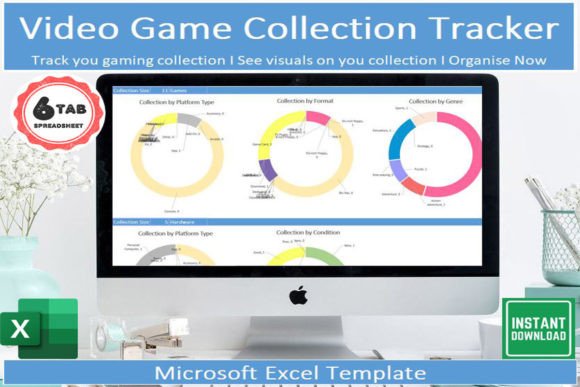
- Dashboard – An automatically updated visual summary that transforms your raw entries into charts and metrics, giving you at-a-glance understanding of your collection’s size, distribution, and value.
Each tab includes pre-defined column headers and drop-down lists to speed up data entry and maintain consistency. You can filter, sort, and search across entries without writing any formulas.
Pre-designed Data Structure
The template comes ready with fields that matter most to collectors: title, platform, release year, genre, condition (e.g., mint, used, damaged), purchase price, current estimated value, and personal notes. For hardware, similar fields cover model, manufacturer, generation, condition, accessories included, and purchase details. This structure eliminates the need to design a system from scratch and ensures you capture the main details without overcomplicating things.
Drop-down Lists for Consistency
Categories such as platform (Nintendo Switch, PlayStation 5, Xbox Series X, etc.), genre (action, RPG, simulation), and condition have pre-populated drop-down menus. You can modify these lists to match your specific collection. Consistent categorization later makes filtering and dashboard charts accurate.
Filter, Sort, and Search
Because everything lives in native Excel tables, you can use built-in filtering to show only games from a certain platform or hardware from a specific decade. Sorting by price, date added, or rarity is immediate. This flexibility is especially useful when your collection grows beyond a few hundred entries.
The Dashboard
The dashboard is the template’s most visually compelling component. It automatically pulls data from your entry tabs and displays summary statistics: total number of games, total hardware items, estimated total value, most common platform, genre breakdown pie chart, and a timeline showing when items were added. For someone who has been collecting for thirty years, seeing those numbers and charts provides a tangible sense of the breadth and depth of your library. The dashboard refreshes whenever you update the underlying data, so you always have current insights.
Mobile Access via Free Excel App
Microsoft offers a free Excel app for iOS and Android. By saving your spreadsheet to OneDrive, you can open the template on your phone or tablet. This means you can add new purchases as soon as you get home—or even while standing in the store checking your wish list. The app preserves all drop-downs, filters, and dashboard functionality, though some advanced chart interactions are best experienced on a desktop.
The Long-Time Collector
Imagine someone who started collecting PlayStation 1 games in the late 1990s and now has thousands of titles across eight platforms. Without a tracker, they risk buying duplicates or losing track of rare variants. The Video Game Collection Tracker Library allows them to log each acquisition, note condition, and see at a glance which consoles are overrepresented. The wish list tab helps them prioritize gaps without exceeding budget.
The Reseller or Small Store Owner
For someone flipping games or managing a small inventory, the hardware tab is invaluable. They can track what cables are included with each console sale, condition of each item, and purchase price vs. estimated resale value. The dashboard’s value overview helps them understand profit margins and which platforms move fastest.
The Parent Managing a Family Collection
A household with multiple children may own dozens of game cartridges that get mixed up. The template lets a parent log every game, assign it to a child (via a custom field), and quickly locate a particular title before a road trip. The mobile access means checklists can be consulted at garage sales or thrift stores.
The Collector Considering Insurance
If a collection is valuable enough to insure, you need detailed records. The template captures estimated replacement value, purchase date, and condition—data an insurance adjuster would request. The dashboard can generate a summary report that serves as a snapshot for your policy.
Strengths
- Simplicity. No need to learn database software or scripting. If you can type into Excel cells and use drop-downs, you can use this template.
- Immediate Visual Feedback. The dashboard transforms raw data into actionable insights without requiring any chart-building skills.
- Flexibility. You can add custom columns, rename fields, or adjust drop-down lists to match your specific needs. The template is a starting point, not a rigid cage.
- Offline Availability. Unlike cloud-only collection apps, your Excel file lives on your computer or phone. You control the data.
- Cost-Effective. The digital download is a one-time purchase. No recurring subscription or premium features locked behind paywalls.
Considerations and Limitations
- Requires Microsoft Excel. You need the desktop or mobile version of Excel (Office 365, Excel 2019 or newer). The free Excel web app may not support all features (like the dashboard charts).
- Manual Data Entry. Populating the template for an existing large collection takes time. Plan to enter items in batches.
- No Automatic Barcode Scanning or Price Database. If you want to pull up current market prices from PriceCharting or eBay automatically, this template does not integrate with external APIs. You must manually input estimated values.
- Limited Multi-User Collaboration. Because it’s an Excel file, simultaneous editing is cumbersome without SharePoint or OneDrive co-authoring, which can cause conflicts.
- Scalability. While Excel can handle thousands of rows, very large collections (10,000+ items) may slow down filtering and chart refreshes. However, most personal collections are well within comfortable limits.
Practical Expectations: Getting Started and Daily Use
After downloading the file, open it in Excel and read the included instructions sheet (it explains each field and offers tips on customizing drop-downs). Begin by entering your most recent purchases or the games you can recall easily. Do not try to input everything at once—focus on one platform or one shelf per session. Use the wish list tab to capture items you encounter during your gaming browsing. Over the first week, you will likely fill in about 70-80% of your known collection. The rest will come as you find strays.
Once the initial data is in, maintenance is minimal. When you buy a new game, add it to the current games tab while the receipt is fresh. If you sell or trade an item, delete or mark it as sold (you can add a custom status column). The dashboard will automatically update to reflect the change. Every few months you might review the wish list to adjust priorities.
The template's strength lies in its gentle learning curve. Most users report becoming comfortable within thirty minutes. The time saved later—avoiding duplicate purchases, locating a game quickly, or producing a valuation report—far outweighs the initial effort.
Who Should Use the Video Game Collection Tracker Library?
This template is a fit for anyone who owns more than fifty games and wants to organize them without investing in complex database apps or learning spreadsheet macros. It works well for:
- Casual collectors who want a simple clean inventory.
- Enthusiasts who appreciate data and visuals about their hobby.
- People who already use Excel for other budgeting or planning tasks.
- Those who prefer offline control over their data, rather than trusting a third-party cloud service.
If you need advanced features like automatic price fetching, barcode scanning, or cloud synchronization across devices without extra steps, a dedicated collection management app might be more suitable. But for straightforward, reliable organization with insightful dashboard summaries, this Excel template delivers exactly what it promises.
Conclusion: A Simple Tool for a Lasting Collection
After three decades of gaming, a collection tells a story. Each game and piece of hardware represents a memory, a genre explored, a multiplayer session with friends. The Video Game Collection Tracker Library helps you preserve that story while making practical day-to-day management easy. You will never again wonder if you already own a particular JRPG or whether you have the right power cord for that retro console. The included dashboard provides a satisfying panorama of your hobby’s scope, and the mobile support means you can update your library on the go. For anyone serious about their gaming past and future, this template is a reliable, no-fuss companion.