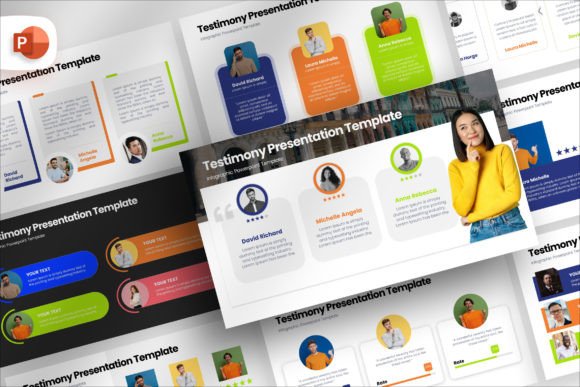
Testimonial Infographic Presentation
Testimonials are the backbone of trust in any business, yet they are often tucked away in a dull corner of a website or buried at the end of a slide deck. A Testimonial Infographic Presentation changes that entirely. It elevates customer feedback from simple text to a visual narrative that captures attention, builds credibility, and drives action. Whether you need to impress investors, close a sale, or engage an audience, transforming raw quotes into structured, visually compelling stories makes your message resonate far more deeply.
Why Visualizing Social Proof Matters
A block of text, no matter how glowing the review, is easy to skim past. An infographic presentation uses layout, hierarchy, and design elements to guide the viewer’s eye to the most important parts of a success story. The 72 unique slides in this template provide a vocabulary of layouts that break down complex case studies, highlight key metrics, and present multiple testimonials in a cohesive, branded format. The professional 16:9 aspect ratio ensures your content looks polished on any screen, from laptops to projectors.
This approach matters because different people process trust signals differently. A potential client may need to see a result visualized in a graph. A partner may want to read a detailed narrative of a project’s impact. An infographic style allows you to serve all these preferences simultaneously, combining visual proof with narrative depth.
Marketing Professionals and Business Owners
For a marketing manager or entrepreneur, every presentation is a chance to influence a decision. The primary concern is conversion. This template allows you to structure testimonials in a way that addresses specific objections, showcases measurable results, and builds a logical argument for choosing your service. The drag-and-drop picture placeholders with auto-adjustment features mean you can populate a deck with real client logos, headshots, and product screenshots in minutes. The editable mockups let you present a customer’s live dashboard or mobile app directly alongside their quote, making the evidence tangible and persuasive. You spend less time formatting and more time crafting a compelling story that supports your sales or marketing goals.
Freelancers, Creators, and Consultants
When you work independently, your presentation materials often serve as your design team. A polished, professional image is essential for winning high-quality clients. This presentation template acts as a shortcut to that level of polish. You can use it to create a visually stunning portfolio page, a leave-behind PDF for client meetings, or a compelling social media carousel showcasing your best results. The flexibility to adjust colors, transparency, and shapes means you can match your personal brand identity without starting from a blank canvas. For example, a freelance web designer can use the device mockup slides to present a client’s new website alongside their testimonial, visually tying the feedback directly to the delivered work. It helps you look established, even when you are building your reputation from the ground up.
Educators, Coaches, and Trainers
For an educator or coach, testimonials are proof of transformation. The infographic style is uniquely effective here because it allows you to visually map a student’s journey—from initial challenge to ultimate success. You can break down a detailed case study into digestible parts: the problem, the intervention, the result, and the direct quote. The structured, clean layouts maintain clarity, ensuring the focus stays on the narrative of growth rather than decorative complexity. The 72 slides give you the range to create a comprehensive success story library that can inspire new students and demonstrate the tangible value of your coaching or program. You can use a timeline infographic to show progress and a highlight slide to feature the student’s most powerful words.
Beginners and Hobbyists Seeking Professional Results
If you are new to creating professional presentations, the gap between what you envision and what you can execute can feel wide. A rigid template can be limiting, but the fully editable nature of this deck makes it a forgiving and educational tool. You can experiment with colors, fonts, and layouts without worrying about breaking the design. The included documentation file guides you through the customization process, lowering the barrier to entry. You get a professional result on your first attempt, which builds confidence and teaches you fundamentals of layout and visual hierarchy. For a small business owner or a hobbyist creating a presentation for a local event or community group, this means your message is delivered with a credibility that commands respect, without requiring a background in graphic design.
Ease of Use Versus Deep Customization
The drag-and-drop picture placeholders with auto-adjustment size, transparency, and shape features are designed for speed. If you need a deck ready in an hour, you can drop your content in and have a polished result. If you prefer deep creative control, the same tools allow you to tweak every vector, color gradient, and positioning. The shape color, size, and position are fully editable, giving you the power to create something truly unique. Your priority determines how you use the template—either as a rapid layout engine or as a deep customization starting point.
Quality of Presentation and Realism
The inclusion of device mockups adds a layer of professionalism that is often missing from standard testimonial slides. Instead of merely quoting a client’s words, you can show their product or service in use on a realistic screen. This visual context enhances perceived value and makes your presentation feel current and polished. For a startup pitching to investors, this detail can make the difference between a forgettable slide and a memorable piece of evidence that supports your growth story.
Long-Term Versatility and Learning Value
With 72 unique slides, this is not a one-project tool. It serves as a recurring resource for all your client feedback presentations. You can mix and match layouts to keep your brand’s storytelling fresh across different proposals, reports, and marketing materials. For a beginner, it also offers significant learning value, as studying the pre-built layouts helps you understand how to structure information effectively for different audiences and platforms.
Matching the Template to Your Specific Needs
Before you begin, consider your end goal. Is it a rapid slide deck for a sales call? A detailed case study PDF for your website? A series of images for an Instagram carousel or LinkedIn post? The 16:9 slides are perfectly suited for digital screens and projectors, and the editable components make it easy to export individual slides as high-quality images for social media. If your priority is speed, rely on the drag-and-drop placeholders and pre-set color schemes. If your priority is brand alignment, invest time in customizing the color palette and typography using the included font pack. The template is flexible enough to accommodate both approaches, but identifying your primary need will help you use it most effectively.
Your customers’ voices are your most persuasive asset. Giving them a polished, professional platform ensures they are heard clearly and remembered. Whether you are closing a deal, inspiring a class, or building a brand, this presentation toolkit provides the structure and flexibility you need to let your success stories stand out and do their best work.