How to Choose the Right Habit Tracker Canva Template for Your Workflow
Tracking habits is one of those activities that sounds simple in theory but often proves tricky in practice. You might start with a notebook, switch to an app, and then search for something that feels both personal and flexible. This is where a habit tracker Canva template enters the picture. It offers a middle ground between a blank sheet of paper and a rigid digital tool, giving you room to design something that actually fits the way you work. But not every template is the same, and understanding the differences can help you pick one that supports your goals rather than adding another layer of busywork.
What a Habit Tracker Canva Template Actually Offers
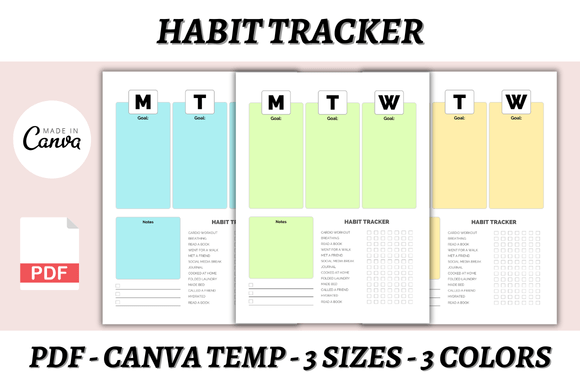
A habit tracker Canva template is a pre-designed layout that you can customize inside Canva, a free online graphic design platform. Instead of starting from scratch, you open the template, adjust the colors, fonts, icons, and layout, and then print it or use it digitally. The version described here includes three paper sizes—A4, A5, and US Letter—so you can match it to your preferred notebook or planner. It also comes in three color variations, which means you can choose a palette that feels right for your eyes and your space.
What makes this kind of template distinct is not the design itself but the flexibility it gives you. You are not locked into one format. You can resize elements, swap out icons, add your own logo, and even change the overall layout style. That level of control matters if you have tried tracking habits before and found that a one-size-fits-all approach did not stick. A habit tracker Canva template essentially hands you a structure without forcing you to follow it blindly.
Comparing Editable Templates with Other Habit Tracking Options
When you step back and look at the broader landscape of habit tracking, you will notice that people tend to gravitate toward a few common approaches. Understanding where an editable Canva template fits among those options can help you decide whether it is the right tool for your situation.
Paper and Notebook Trackers
A traditional paper tracker involves drawing a grid in a notebook, listing your habits, and marking progress each day. The strength here is simplicity. You do not need any technology, and the act of physically checking a box can feel satisfying. The tradeoff is that you have to create the grid each time, or commit to a specific layout for an entire notebook. If your habits shift—maybe you want to add a new behavior or change the frequency—you are stuck with what you already drew. A habit tracker Canva template solves that by letting you edit the layout on the fly. You can print a fresh version whenever your routine changes.
Digital Habit Tracking Apps
Apps like those found on your phone or desktop offer reminders, streaks, and data visualizations. They are great for people who want automation and don't mind screen time. But apps come with their own limitations. You may need to pay a subscription to unlock useful features. You might also find that the interface does not match your aesthetic preferences or that you spend more time setting up the app than actually tracking. A habit tracker Canva template gives you something tactile without the subscription costs. You can print it, keep it on your desk, and check your progress without unlocking a phone. That small friction reduction can make a real difference in consistency.
Printable PDFs and Fixed Templates
Many printable habit trackers are sold as ready-to-use PDFs. You download them, print them, and start using them immediately. These are convenient, but they are not editable. If you want to change the color, add a personal logo, or adjust the habit categories, you are out of luck. The habit tracker Canva template described here gives you the editable source file. You can modify it before printing, which means it can evolve with your needs. That is a significant distinction for anyone who values customization over pure convenience.
Strengths of Using an Editable Habit Tracker Canva Template
One of the most practical strengths is the time you save by not designing from scratch. You still get a fully designed layout, but you can tweak it in minutes rather than hours. For bloggers, small business owners, content creators, or Etsy sellers, this efficiency is valuable. You might want to create a branded habit tracker for yourself or even customize versions to sell on your own website, Shopify, or Gumroad. The license that comes with this template allows that kind of reuse, which is not always the case with other free or paid templates.
Another strength is the range of sizes. A4 is common in Europe and for desk use. US Letter is standard in North America. A5 fits nicely into a traveler's notebook or a small planner. Having all three means you are not forcing a template into a size that does not suit your carrying method. You simply pick the size that matches your existing system.
The three color options also help with long-term usability. If you get bored with one color scheme after a few months, you can switch to another without redesigning anything. That might seem like a small detail, but visual fatigue is a real barrier to maintaining any habit tracking routine.
Tradeoffs and Limitations to Consider
No tool is perfect for everyone, and a habit tracker Canva template has its own set of tradeoffs. The most obvious one is that you need a Canva account. Canva offers a free tier, but some advanced features—like certain fonts, elements, or export options—require a paid subscription. If you already use Canva regularly, this is not an issue. If you are new to the platform, you will need to spend a little time learning the basics of editing. The learning curve is very shallow, but it is still a step that a ready-made PDF does not require.
Another limitation is that a printed habit tracker is static. Once you print it, you cannot undo a mark or change a habit without printing a new sheet. Some people prefer the permanence of paper because it forces commitment. Others find it frustrating when they make a mistake or want to adjust their habit list mid-month. The template allows you to print multiple versions, but you do have to plan ahead a bit.
There is also the question of digital tracking versus paper. If you rely on automatic reminders and want your data synced across devices, a paper tracker will not give you that. You have to remember to check your tracker manually. For some, that is a benefit because it reduces screen time. For others, it creates an extra step that they skip on busy days. Knowing your own tendency matters here.
When This Template Is the Right Choice
You are likely a good fit for this habit tracker Canva template if you value control over your layout and you are not afraid of a small amount of up-front customization. It works well for people who have tried generic trackers and found them lacking in style or fit. If you are a blogger or content creator who wants a consistent visual brand across your planning tools, having an editable template lets you match your tracker to your existing color palette and typography.
This template is also a strong option if you are selling planners, journals, or digital products. The ability to customize and then resell the design is a practical advantage. You can create multiple versions for different audiences without duplicating work. The instant download and lifetime access mean you are not paying recurring fees, which is appealing for small shop owners who are watching their margins.
For someone who wants to track habits as part of a broader self-management system, the multiple paper sizes make it easy to integrate with a bullet journal, a ring-bound planner, or a simple clipboard. You are not forced into a proprietary format.
When You Might Need a Different Option
If you absolutely do not want to touch any design software, not even a simple editor like Canva, then a ready-to-print PDF or a pre-filled notebook will serve you better. The same applies if you need automated reminders, habit streaks calculated for you, or data exportable to a spreadsheet. Those are features that only a dedicated app can provide.
Another scenario is if you prefer a completely minimal tracker with no extra visual elements. A habit tracker Canva template includes design flourishes like icons, color blocks, and layout choices. You can simplify it within Canva, but if your ideal is a pure grid with nothing else, you might be faster drawing it yourself or finding a bare-bones template elsewhere.
If you track a very large number of habits daily—say more than ten or twelve—you may find that the template's layout does not give you enough rows. In that case, you could edit the template to add more rows, but it would require adjusting the spacing and font size. That is doable in Canva, but it takes a few extra minutes. A notebook with blank grid paper might be more flexible for extreme volumes.
Practical Factors to Weigh Before Choosing
Before you decide, think about how you actually behave when tracking. Do you prefer to see a full month on one page, or do you like weekly spreads? Some habit tracker Canva templates are set up for monthly tracking, which works well for habits you want to build over time. If you prefer weekly tracking because you rotate habits more often, you might need to edit the template or look for a weekly version.
Consider where you will place your tracker. If it lives on a desk, A4 or US Letter is fine. If you carry it in a bag or pocket, A5 is more practical. The template gives you all three, so you can test which size you actually use before committing to one for the long term.
Also think about your willingness to print. Not everyone has a printer at home. If you need to go to a print shop or order prints online, that adds a small cost and delay. Digital use is possible if you have a tablet with a note-taking app, but the template is designed primarily as a printable product. Using it on a tablet requires importing it into an app like GoodNotes or Notability, which is an extra step.
Making the Decision That Fits Your Routine
The best habit tracking method is the one you actually use consistently. A habit tracker Canva template gives you a middle path between rigid pre-made designs and the blank page. You get enough structure to avoid the hassle of drawing from scratch, but enough freedom to make it your own. That balance is useful for people who want a tool that feels personal without requiring graphic design skills.
If you are comparing this kind of template to other options, focus on your tolerance for setup time versus your need for ongoing flexibility. If you are willing to spend ten to fifteen minutes customizing a template once, and then print as needed, you will likely find this approach efficient and satisfying. If you want zero setup and unlimited automation, an app or a pre-filled notebook will probably serve you better.
Having three color choices and three sizes available from the start reduces the odds that you will need to shop for another template later. That kind of convenience is worth considering if you have tried multiple trackers in the past and none of them stuck. A habit tracker Canva template that you can edit, logo, and color to your liking might be the version that finally becomes part of your daily routine.