Inventory Tracker I Google Sheets: A Practical Tool for Small Business Owners
If you run a small business, you already know the juggling act. Materials come in, products go out, costs pile up, and somewhere in between you need to know if you are actually making money. I created this Inventory Tracker Template Tool because I lived that scramble myself. Jotting down material costs on random scraps of paper or guessing how much inventory is sitting on the shelf doesn’t work when you need real numbers. This Google Sheets based tracker gives you a clean system to monitor materials and finished products side by side, with dashboards that turn raw data into actionable insights. Whether you are selling handmade candles, digital downloads, or packaged goods, this tool helps you stay on top of what you have, what it cost, and what it is worth.
What Is Inventory Tracker I Google Sheets?
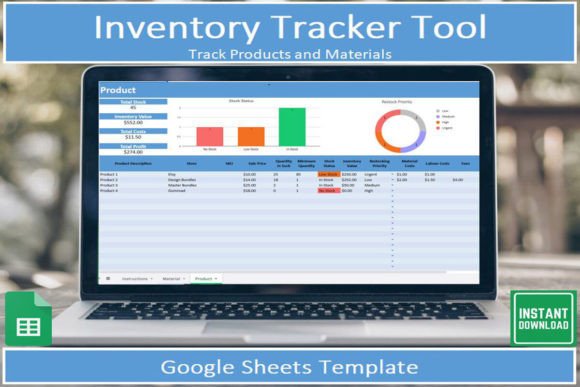
At its core, this is a two-tab spreadsheet template designed for Google Sheets. The first tab focuses on materials: you log every raw ingredient, component, or supply you buy, along with the price, quantity on hand, the total value of that stock, and where you purchased it. The second tab tracks the finished products you make. Here you can record each product, the materials used, your profit margins, total inventory value, costs, and overall profit. Instead of digging through receipts or spreadsheets you built yourself, you get drop-down lists for common categories, pre built formulas that calculate totals automatically, and two dashboards that show you visual graphs of your inventory and financial performance. The template includes clear instructions so even if you are not a spreadsheet expert, you can get started within minutes.
When and Why You Might Need an Inventory Management Spreadsheet
There is a moment when handwritten notes stop working. Maybe you are a maker who sells at weekend markets and suddenly realize you don’t know how much wax or wick is left before the next batch. Or you are a freelancer who also sells physical products online and needs to separate material costs from your service income. That moment is exactly when a dedicated inventory tracker becomes essential. You need to know, quickly, how much capital is tied up in supplies, which products give you the best margin, and when to reorder materials before you run out. Without that visibility, you risk overstocking items that don’t sell or missing sales because you underestimated your material needs.
For example, consider a soap maker who buys oils, fragrances, and colorants in bulk. Each bar of soap uses a different combination. By logging every purchase and linking those costs to each product batch, they can see exactly what each bar costs to produce and what price they need to charge for a healthy profit. The same logic applies to a print seller who tracks paper, ink, and packaging costs. The template eliminates guesswork and gives you facts you can rely on when setting prices or planning production.
Small product-based business
If you manufacture or assemble products yourself, from candles and skincare to small furniture or food items, this template helps you manage multiple materials and finished goods. You can categorize each material by type (oils, packaging, hardware) and quickly see which suppliers offer the best prices. The product tab then rolls up all those material costs into a single cost per unit. You can spot which products eat into your profit and which ones are your money makers. When you are ready to order more supplies, a quick glance at the dashboard tells you how much stock you have and how much value is sitting in raw materials.
Creative side hustle
Artists, printmakers, and crafters often juggle limited inventory and tight budgets. You might buy a batch of high quality paper one month and use it over several orders. With this tracker, you can log the paper as a material and assign it to each finished piece as you sell it. The cost per product updates automatically, so you know whether your average selling price actually covers the paper, ink, and shipping. The drop-down lists make entering each sale quick, and the mobile version of Google Sheets lets you update stock right after a market or while packing an order.
Educational or community settings
Teachers running a school store or a production class can use this template to keep track of supplies and finished goods. A woodworking teacher, for instance, can log lumber, screws, and finishes as materials. Students produce projects that sell at a fair. The product tab can record each item sold, showing gross revenue and cost of materials used. This gives the class a real life lesson in profit margins and inventory management while keeping the finances organized.
Bloggers and digital creators selling merchandise
If you have an online course, a blog, or a YouTube channel and sell branded merchandise (t-shirts, mugs, stickers), you need to manage stock across multiple products and sizes. This template can track each SKU and link to your supplier purchase records. The dashboard shows total inventory value and helps you decide when to run a sale to clear slow moving sizes. The filter and sort features let you find low stock items quickly so you never miss a restock window.
How Different Users Benefit in Different Situations
For a micro-business owner who wears every hat, the main benefit is time saved. Instead of building your own formulas or manually adding up columns, you open the template, fill in the blanks, and the numbers calculate themselves. The two dashboards give you visual snapshots of total inventory value, cost breakdowns, and profit margins. That means you spend less time on admin and more time on making and selling your products.
For the hobbyist transitioning into an entrepreneur, the built-in profit margin calculations are a game changer. You might know what you paid for materials, but linking those costs directly to each product reveals whether you have been underpricing your work. The template highlights your best and worst performing items, so you can adjust your strategy before you lose money on a popular item that actually has thin margins.
For someone who is always on the go, the free Google Sheets app makes this tool truly mobile. You can open it on your phone while standing at a supplier store to check current prices against what you paid last time. Or update product inventory immediately after a craft fair while the details are fresh. The drop-down lists speed up data entry on a small screen, making it practical for real-world use, not just a desktop exercise.
What to Consider Before Using Inventory Tracker I Google Sheets
Before you download, you need a free Google account. If you do not have one, setting it up takes a few minutes and costs nothing. Once you purchase the digital download, you receive a PDF containing the link to the template and step by step instructions on how to make a copy into your own Google Drive. The template is read only until you copy it, so you never accidentally alter the original. After that, you own the file and can edit categories, add or remove columns, and adapt it to your specific products and materials.
It helps to spend a little time before data entry thinking about how you categorize your materials and products. The template comes with placeholder categories like “Fragrance,” “Packaging,” or “Raw Material,” but you can rename them to match your business. That initial setup pays off later because consistent categories make filtering and dashboards more useful. Also, remember that the dashboard formulas rely on your data being entered in the correct columns. The instructions explain each field, so reviewing them once saves headaches later.
While this template is excellent for small to medium sized inventories, it is not a full fledged ERP system. If you have hundreds of SKUs with complex variants or need multi location tracking, you may need a more advanced solution. For most makers, artisans, and small product sellers, however, it covers the core needs: knowing what you have, what it costs, and what you are earning.
Features That Translate to Real Outcomes
Drop down lists for categories sound simple, but they make a real difference when entering data on a busy day. Instead of typing “wax,” “Wax,” or “beeswax” inconsistently, you pick from a list. That consistency means your dashboard graphs and filter results are accurate. The filter, sort, and search functions let you quickly find a specific material or product without scrolling through hundreds of rows. Whether you need to check the cost of your supplier’s lavender oil or see all products that cost more than $10 to make, it takes seconds.
The dashboards are not just decoration. One dashboard shows your overall inventory value across materials and products, helping you decide if you have too much stock tied up in supplies. The other dashboard breaks down product profitability, showing which items generate the most profit and which might need a price increase or discontinuation. This insight helps you make smarter purchasing and pricing decisions week after week.
Because the template lives in Google Sheets, you can share it with a partner, employee, or accountant. Multiple people can view or edit simultaneously (depending on permissions), so you are not the only one keeping track. And since it syncs automatically to the cloud, you never lose data if your computer crashes.
Practical Tips for Getting the Most Out of the Template
Update material costs as soon as you buy new stock. If prices change from one supplier run to the next, log the new price right away. The product cost calculations use the most recent material cost, so keeping prices current keeps your profit margins accurate. For items where you use a small amount of a material (like half a sheet of paper per print), you can enter the per unit cost or the cost per batch. The template’s formulas are flexible enough to handle both approaches.
Use the product tab to track batch production. If you make a dozen candles at once, enter them as one “batch” with the total materials used. Then adjust the quantity produced. The cost per unit will calculate automatically. This is faster than entering each candle individually and still gives you accurate margins. Review the dashboards weekly, even if you only have a few products. Trends in rising material costs or falling profit margins are easier to catch early when you see them on a graph rather than in a stack of receipts.
Finally, do not be afraid to adapt the template to your exact workflow. The drop-down lists can be edited, new columns can be added (like “expiration date” for perishable materials), and the dashboards update as long as range references stay correct. The template provides a solid foundation, but your business is unique, so make it yours.
At the end of the day, running a small business means balancing creativity with practicality. The Inventory Tracker I Google Sheets template gives you the practical backbone so you can focus on the creative side. It turns raw numbers into clear insights, helps you avoid costly mistakes, and keeps your inventory organized whether you are in your workshop, at a market, or on your phone checking stock. For anyone who makes and sells physical goods, this is a straightforward tool that delivers real value without unnecessary complexity.