Client Tracker CRM Spreadsheet for Small Business
If you run a small business, you already know that keeping client information organized can quickly become overwhelming. Between phone numbers, email addresses, project notes, and follow-up reminders, it's easy to lose track. That's where a Client Tracker CRM Spreadsheet comes in. It's a practical, budget-friendly way to manage customer relationships without the complexity or cost of big enterprise software.
What exactly is this spreadsheet?
The Client Tracker CRM Spreadsheet is a digital tool built inside Microsoft Excel. It's not a cloud-based app with a monthly subscription. Instead, it's a single file you download, open on your computer, and start using right away. Think of it as a smart, organized version of that notepad or messy list you might be using now.
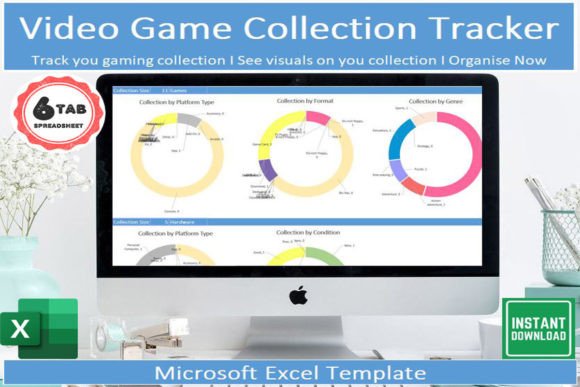
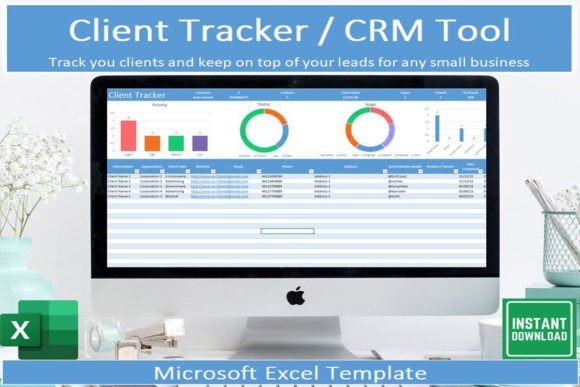
Inside the spreadsheet, you'll find dedicated sections to log client names, contact details, project statuses, notes, and more. The real standout feature is the built-in dashboard. It automatically creates simple graphs that show you at a glance how your client base is growing, where most of your work is coming from, or which services are in demand. You don't need to be an Excel expert to understand what's happening in your business.
Who benefits from a simple CRM tool?
Honestly, almost any small business owner, freelancer, or solo professional can use this. Whether you're a wedding photographer juggling multiple couples, a bookkeeper managing tax clients, or a freelance web designer tracking project milestones, you need a reliable place to store client data. A dedicated client management system helps you stop losing information and start building better relationships.
Many people start their business using paper notes, sticky pads, or even just their email inbox to track clients. That works for a while, but as you grow, things slip through the cracks. A Client Tracker CRM Spreadsheet gives you a structured system without forcing you to learn complicated software or pay monthly fees.
Key features that make it useful
Let's walk through what you actually get with this spreadsheet and why each piece matters for your daily work.
Drop-down lists for fast data entry
Nobody wants to type the same client status or service category over and over. The spreadsheet includes drop-down menus that let you click and select common options. This small feature saves time and keeps your data consistent, which makes filtering and sorting much more accurate later.
A visual dashboard built in
You don't need to create charts yourself. The dashboard automatically updates as you add client information. You can quickly see how many active clients you have, what types of projects are most common, or how your client load changes over weeks and months. This gives you real insight without extra effort.
Filter, sort, and search capabilities
As your client list grows, finding a specific person or group becomes harder. Excel's built-in filtering tools are already powerful, and this spreadsheet is set up so you can search by name, date, status, or any other column. Want to see all clients who haven't been contacted in the last month? A quick filter shows you exactly that list.
Mobile access with the free Excel app
You aren't chained to your desk. Microsoft offers a free Excel app for phones and tablets. You can save your spreadsheet to OneDrive or another cloud service and view or update client info from anywhere. If you have a quick thought about a client while you're out, you can add it right then rather than waiting until you're back at your computer.
Real ways business owners use this tool
Let me share a few realistic examples so you can see how this might fit into your own work.
A freelance graphic designer might have twenty clients at various stages. Some are just inquiring, others have active projects, and a few are on hold. Using the drop-down status list, the designer can quickly categorize each person. The dashboard then shows how many active projects exist, so the designer knows when to stop taking new work. When tax season comes, filtering by completed projects makes invoice tracking straightforward.
A local handyman service could track every home visit. Each client entry might include the job address, the type of repair needed, and the completion date. With sorting, the handyman can easily see which homes are due for seasonal maintenance. The notes section is perfect for recording special details like which gate is tricky to open or which customer prefers morning appointments.
A consultant or coach working with multiple clients can log session dates, follow-up tasks, and payment status. The dashboard reveals which services are most requested and how many clients are recurring. Over time, this data helps the consultant decide where to focus marketing efforts or whether to raise prices.
What problems does this spreadsheet solve?
Small business owners often face a few common pains when it comes to client management. Let's look at how this tool addresses them directly.
Lost information. You met someone at a networking event, wrote their details on a napkin, and now you can't find it. A Client Tracker CRM Spreadsheet gives you one reliable place to record every contact. No more searching through old emails or rummaging through your bag.
Inconsistent follow-up. You meant to call a prospect last week, but life got busy. By logging your last contact date in the spreadsheet, you can filter for clients who haven't been reached out to recently. This simple habit can dramatically improve your conversion rate.
Overwhelming software options. Many CRM tools cost thirty, fifty, or even a hundred dollars per month. For a small business just starting out, that expense is hard to justify. This spreadsheet is a one-time purchase. You own it permanently, and there are no recurring fees. That makes it an ideal entry point for anyone who needs better organization but doesn't have a big budget.
What to consider before you start
This spreadsheet is a powerful tool, but it helps to understand what it is and isn't. Here are a few things to keep in mind.
You need Microsoft Excel
The file is designed specifically for Excel. If you don't already have Excel installed on your computer, you can purchase a one-time license or subscribe to Microsoft 365. The free Excel app for mobile devices is great for viewing and small edits, but the full desktop version gives you the best experience, especially for initial setup.
This is for personal use only
The license for this file is personal. You cannot share it with other businesses, resell it, or distribute it. If you have employees or team members who also need client tracking, each person would need their own copy. This is a standard practice for template creators and helps support the small business that made the spreadsheet.
You manage your own backups
Because the file lives on your computer or cloud storage, you are responsible for backing it up. If your laptop crashes and you haven't saved a copy elsewhere, you could lose your data. It's smart to keep a backup on a service like OneDrive, Google Drive, or Dropbox. This way, you can also access it from multiple devices.
Getting started is straightforward
After you download the file, you'll receive instructions that explain each section and how to use it. You don't need to be an Excel pro. The drop-down lists and built-in dashboard do most of the heavy lifting for you. Start by adding your current clients one by one. You can fill in as much or as little detail as you want. Over time, you'll naturally add more notes and categories as you see what works best for your business.
If you ever have questions, the creator, John at Veritas Templates, encourages you to reach out. That kind of support is rare with large software companies, and it's a nice safety net if you get stuck.
The value of a simple, organized system
What makes a Client Tracker CRM Spreadsheet truly valuable is its simplicity. It respects your time and your budget. You don't have to learn a new platform, watch hours of training videos, or commit to a monthly subscription. You just open Excel and start organizing.
For a freelancer, consultant, or small business owner, that simplicity translates directly into more time spent with clients and less time wrestling with software. The dashboard gives you a clear picture of your business health, and the filtering tools help you stay on top of follow-ups and projects.
In a world where there's always a new, expensive tool to buy, sometimes the best solution is the one that quietly does its job without fuss. This spreadsheet fits that description perfectly. It is a tool that works for you, not the other way around.