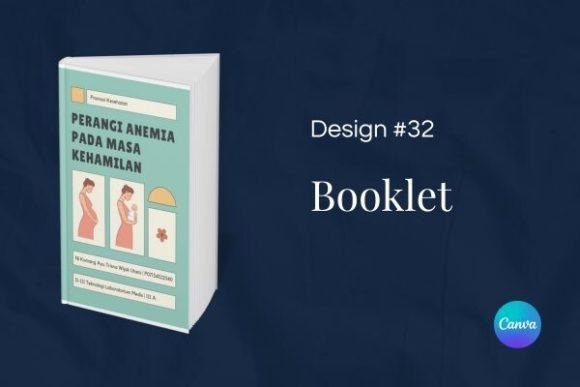
Design 32 - Booklet Template: A Practical Tool for Creating Professional Information Booklets
Creating an information booklet or brochure that communicates clearly and looks polished can be a significant challenge, especially when time and design resources are limited. Many professionals and small business owners find themselves caught between hiring a designer—which is often expensive—or using basic document software that produces results lacking visual coherence. A well-constructed template can bridge this gap, and Design 32 - Booklet Template (often referred to simply as Booklet 32) is one such resource. Created in Canva, this template offers a structured yet flexible foundation for producing booklets that are both functional and visually appealing. This article examines the template in detail, explores its practical value, and helps you determine whether it aligns with your specific needs and workflow.
What Design 32 - Booklet Template Offers
At its core, Design 32 - Booklet Template is a pre-designed Canva template intended for creating information booklets and brochures. It comes as a single file containing 12 pages, with dimensions of 148 x 210 mm—the standard A5 size, which is compact enough to handle comfortably yet spacious enough to present substantial content. The template's aesthetic leans toward the unique and beautiful, incorporating decorative elements such as floral or butterfly motifs that give it a distinct character without overwhelming the core information.
The template is built entirely in Canva, a widely used online design platform. This means no specialized software is required; anyone with a free or pro Canva account can open it, edit it, and produce a finished booklet. The design is composed of movable, editable components—text boxes, images, shapes, and backgrounds—all of which can be replaced or rearranged to suit your content and brand. You are not locked into a rigid layout; instead, you receive a starting point that already handles layout, color balance, and typography, allowing you to focus on your message.
Ease of Use and Editing
The most straightforward strength of Booklet 32 is its editability. Canva's interface is intuitive, and the template respects that simplicity. You can move elements by dragging, replace placeholder text by clicking, and swap images with your own by using the upload or library function. The template does not require any coding, scripting, or advanced design knowledge. If you can use a basic word processor or presentation tool, you can edit this template effectively. This makes it particularly valuable for professionals who need to produce booklets regularly but lack a dedicated design team.
Consistency Across Pages
A common problem with do-it-yourself booklets is that each page can feel disconnected from the others. Design 32 addresses this by providing a coherent visual language—consistent use of colors, typefaces, spacing, and graphic elements across all 12 pages. This uniformity is not limiting; it provides a professional anchor. Your readers will perceive the booklet as a single, thoughtful document rather than a collection of slapped-together slides. For marketing materials, annual reports, or informational guides, this consistency directly contributes to credibility and trust.
Flexibility for Different Content Types
The template is not designed for one specific industry or use case. Its layout includes spaces for headings, body text, bullet points, images, and graphics. Whether you are creating a product brochure, a service guide, an event program, or an educational handout, the structure can accommodate your content. You can repurpose pages—for example, turning a photo grid page into a timeline or a feature list page into a case study. The decorative elements are present but not dominant, so you can tone them down or remove them if a more minimal look is needed.
Quality of Output
The final printed or digital quality of your booklet depends on your inputs—resolution of images, clarity of text, and careful proofreading. However, Design 32 - Booklet Template provides a strong starting point. The typography choices are legible, the color schemes are harmonious, and the layout respects standard margins and spacing. When exported from Canva as a high-resolution PDF (print) or PNG/PDF (digital), the results look purposeful. For small print runs or digital distribution, the output is more than adequate. For high-volume professional printing, you may still need to ensure bleed and trim settings are applied correctly—Canva's print export options handle this reasonably well for standard sizes.
Reliability Across Projects
One indication of a template's reliability is how well it holds up when you push it beyond its obvious use. In testing Booklet 32, the template remains stable even when you replace all decorative elements with your own brand assets. The underlying grid and spacing hold, preventing text from overlapping or images from misaligning. The layered structure in Canva allows you to lock background elements while editing foreground text, reducing accidental disruption. This reliability is crucial for professionals who cannot afford to waste time fixing layout errors mid-project.
Presentation and Readability
A booklet must be easy to read and visually paced. Design 32 uses a clear hierarchy of elements—headings are prominent, body text has sufficient line spacing, and images have room to breathe. The decorative touches, such as ornamental borders or small icons, add character without distracting from the main content. This balance is often what separates a template that merely looks pretty from one that actually communicates effectively. For audiences that value aesthetics—such as clients in creative industries, higher education, or lifestyle services—this template delivers a favorable impression.
Entrepreneurs and Small Business Owners
If you are running a small business or startup, you likely handle multiple roles, including marketing. Design 32 - Booklet Template allows you to produce professional-looking brochures for trade shows, client meetings, or promotional mailings without hiring a designer. The 12-page format is long enough to cover your services, case studies, pricing, and contact information in a structured way. You can also repurpose the same template for different offerings simply by swapping content and images.
Marketers and Content Creators
Marketing professionals who need to create content quickly will appreciate the template's speed. Instead of building a booklet from scratch, you can open Booklet 32, replace the placeholder content with your campaign information, and have a finished asset in a few hours. Freelancers and independent creators—bloggers, coaches, consultants—can use it to produce lead magnets, portfolio summaries, or program guides. The aesthetic is modern and approachable, which aligns well with digital-first audiences.
Educators and Nonprofit Professionals
Teachers, trainers, and nonprofit coordinators often need to produce informational materials with limited budgets. This template can be used for course handouts, workshop booklets, annual reports, or volunteer orientation guides. Its clear layout makes dense information more digestible. Since Canva is free to use at a basic level, and the template itself is reasonably priced (often between $5 and $15 on marketplaces), it fits tight budgets while still delivering a professional result.
Serious Hobbyists and Event Organizers
Hobbyists involved in genealogy, gardening, cooking, photography, or community events can also benefit. The template's decorative style adds personality to booklets intended for club newsletters, event programs, or personal projects. The 148 x 210 mm size is convenient for printing at home or at local print shops, and the 12-page count gives enough space for a comprehensive guide without feeling overwhelming.
What Works Well
Use Design 32 - Booklet Template when you need a finished booklet quickly and your brand identity leans toward a clean, slightly ornamental aesthetic. It works best for content that is text-heavy but well-structured—such as lists, explanations, and case studies. If you are creating a simple three-fold brochure, this template may be more elaborate than you need, but for a multi-page booklet that conveys depth, it is a solid choice. To get the most out of it, prepare your images and text in advance, and consider creating a brand kit in Canva (colors, fonts, logo) to apply consistently across the template.
Possible Limitations to Consider
No template is perfect for every situation, and Booklet 32 has a few limitations worth noting. First, the decorative elements—while attractive—may not suit all industries. Corporate law firms, medical practices, or very conservative sectors might find the design too whimsical. In those cases, you could remove or replace decorative elements, but doing so may require more editing time. Second, the template is designed for A5 (148 x 210 mm). If you need a different size, you will have to resize in Canva, which can shift element positioning and require manual adjustment. Third, because this is a Canva template, you cannot use it outside of that platform. If your workflow relies on Adobe InDesign or another professional layout tool, you would need to recreate the design from scratch, which defeats the purpose of using a template.
Another practical consideration: the template includes 12 pages. If your content fits into 8 or 10 pages, you may have blank or underused pages, which you could either delete or fill with supplementary content. Conversely, if you need more than 12 pages, you would have to duplicate pages and maintain consistency manually. Canva does support multi-page documents, but extensive duplication can become tedious.
Long-Term Value and Reusability
For professionals who produce booklets regularly, Design 32 - Booklet Template offers good long-term value. Once you have customized it to your brand—replacing colors, fonts, and logo—you can save it as your own template within Canva. Future booklets require only updating text and images, which dramatically reduces production time. The template is not a one-use asset; it becomes a reusable framework. This repeatability is especially valuable for businesses with seasonal catalogs, quarterly reports, or event programs.
Final Assessment
Design 32 - Booklet Template is a practical, well-constructed resource for anyone who needs to create professional information booklets without the overhead of custom design. Its strengths lie in ease of editing, visual consistency, and flexibility across different content types. While it may not suit every industry or every project size, it addresses a common need—producing attractive, readable booklets efficiently. For small business owners, marketers, educators, and content creators, it represents a reliable tool that balances aesthetics with utility. If you value speed, simplicity, and a distinctive look, this template is worth considering for your next booklet project.