Wedding Seating Planner for Google Sheets
If you are planning a wedding, you already know that seating is one of the most logistically demanding pieces of the puzzle. Between keeping peace among family members, accommodating dietary restrictions, and making sure everyone has a good view of the ceremony or head table, a solid seating plan can feel like a small miracle. That is exactly where the Wedding Seating Planner for Google Sheets steps in. It is a straightforward, no-fuss digital tool designed to help you map out your reception layout, track guest counts in real time, and keep your sanity intact through the final stretch of planning. This is not a complicated piece of software or a bulky spreadsheet with endless hidden formulas. It is a clean, approachable template that works with your existing Google account and updates instantly on your phone, tablet, or laptop.
What Makes This Wedding Seating Planner Different
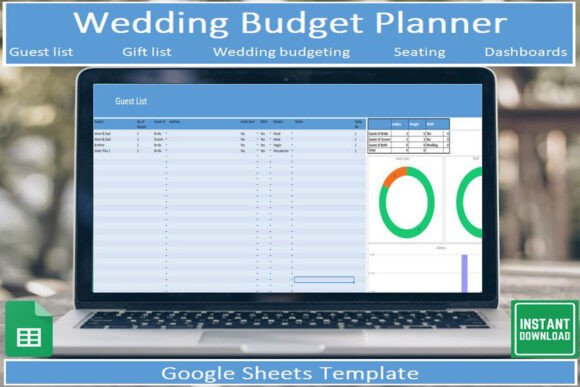
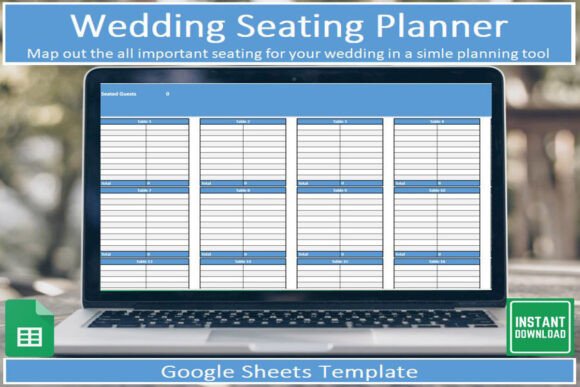
The Wedding Seating Planner for Google Sheets is built around one core idea: simplicity. The template arrives as a digital download in PDF format, and inside that PDF is a link that takes you straight to the Google Sheets file. Once you click the link and make a copy, the template is yours to customize. No software installation, no steep learning curve, no design experience required. The visual style is clean and minimal, with clearly labeled columns, color-coded sections, and a dedicated sheet for your seating layout. The personality of the template is practical and friendly. It does not try to be flashy or over-designed. Instead, it focuses on clarity and ease of use, so you spend less time fiddling with cells and more time making decisions about who sits next to whom.
The overall appeal lies in its accessibility. Because it lives inside Google Sheets, you can open it on any device with the free Google Sheets app. That means you can update your seating plan while waiting for a coffee, check your guest count on the go, or share the file with your partner or wedding planner without worrying about version conflicts. The template includes a built-in running total of guests, so you always know exactly how many people are accounted for at any given moment. That single feature alone can save you from the headache of manually counting and recounting names as RSVPs roll in.
How the Template Works in Real Life
When you open the template for the first time, you will see a few tabs. One tab contains instructions that explain exactly what each column does and how to use the built-in features. Another tab is your main planning sheet, where you list guests, assign table numbers, and note any special requirements like dietary preferences or accessibility needs. There is also a dedicated sheet for mapping out the physical seating arrangement, which is especially useful if you are working with a venue that has multiple rooms or an irregular layout.
The workflow is straightforward. You start by entering guest names and their plus-ones. Then you assign table numbers or section labels. The running total updates automatically, so you can see at a glance how many guests are seated and how many tables are full. If you need to rearrange, just drag and drop names or update a cell. The template does not lock you into any rigid structure. If you want to add extra columns for meal choices or song requests, you can do that without breaking anything. The design is intentionally flexible, because every wedding is different, and your seating plan should reflect your own priorities.
Tracking Guest Counts Without the Math
One of the most underrated features of the Wedding Seating Planner for Google Sheets is the automatic guest count. When you are in the thick of planning, especially during the final weeks, knowing exactly how many people have confirmed can make or break your budget, your catering order, and your venue layout. The template eliminates the need to manually tally numbers after every email or phone call. As you update the status of each guest from "invited" to "confirmed" or "declined," the running total adjusts instantly. It is a small mechanical win, but it adds up to real peace of mind when you are juggling a dozen other tasks.
Who Benefits Most From This Template
This template is a great fit for anyone planning a wedding who wants a reliable, low-maintenance way to manage seating. If you are a bride or groom handling most of the planning yourself, the simplicity of the tool means you can focus on the bigger picture without getting bogged down in spreadsheet details. If you are a wedding planner or coordinator, the template gives you a clean foundation that you can adapt for multiple clients without starting from scratch each time. Entrepreneurs and small business owners who occasionally help friends or family with event logistics will also appreciate how quickly the template can be set up and shared. Even bloggers or content creators who are documenting their wedding planning journey can use the template as a behind-the-scenes asset, showing their audience a practical example of organized planning.
The template also works well for non-wedding events. If you are planning a large family reunion, a milestone birthday party, or a corporate dinner, the same seating layout logic applies. You can reuse the template simply by making another copy from the original file. That flexibility makes it a smart addition to your collection of digital planning assets. It is not a one-time use tool. It is a reusable framework that can adapt to whatever event you need to organize.
Practical Tips for Getting the Most Out of the Template
To make the Wedding Seating Planner for Google Sheets work best for you, start by reading the instructions tab. It takes only a few minutes, and it will save you from guessing how certain features work. Next, take some time to think about your seating logic before you start entering names. Do you want to group guests by family, by friend group, or by how well they know each other? Do you need to separate certain people for practical or personal reasons? Having a rough plan in mind will make the data entry process much faster and reduce the number of changes you need to make later.
It is also worth thinking about how you will share the template with others. If you are working with a partner or a wedding planner, give them edit access so they can update the sheet in real time. If you are sharing a preview with a venue coordinator or caterer, you can export a PDF of the seating layout without exposing the full spreadsheet. Google Sheets makes it easy to control who sees what, and the template is set up to support that kind of selective sharing.
Another practical consideration is color coding. The template does not come with a strict color scheme, which is actually a strength. You can use cell background colors to mark table numbers, meal choices, or special notes like "needs high chair" or "VIP." A simple system of three or four colors can turn a plain grid into a visual map that you can read at a glance. This is especially helpful on the day of the event, when you might need to answer a last-minute question about where someone is seated without scrolling through rows of text.
Reusing the Template for Multiple Events
One of the most practical features of this tool is how easy it is to reuse. Because the template lives in Google Sheets, you can make a fresh copy anytime you need to plan a new event. The instructions tab stays with the original file, so you always have a reference. If you plan multiple weddings or events each year, you can keep a master copy with your preferred column headers and formatting, then duplicate it for each new project. This eliminates the need to rebuild your seating layout from scratch every time and ensures consistency across your planning process.
Why This Approach Works Better Than Paper or Generic Spreadsheets
Paper seating charts have a certain charm, but they are nearly impossible to update when RSVPs change or guests cancel at the last minute. A generic blank spreadsheet can work, but it lacks the built-in running total and the dedicated layout sheet that make the Wedding Seating Planner for Google Sheets feel purpose-built. The template bridges the gap between analog simplicity and digital flexibility. You get the ease of a ready-made structure without the rigidity of a pre-printed chart. And because it is connected to your Google account, you never have to worry about losing the file or forgetting which version is current.
There is also a comfort factor in knowing that the tool is free to use once you have the link. You do not need to pay for a premium subscription or download special software. The only requirement is a free Google account, which most people already have. That low barrier to entry means you can test the template immediately, see if it fits your workflow, and decide whether to stick with it or try something else. No commitment, no cost, no risk.
Final Thoughts on Staying Organized With This Seating Planner
The Wedding Seating Planner for Google Sheets is a practical example of how a well-designed digital tool can reduce stress during a busy planning season. It does not promise to solve every problem you will face, but it does handle one of the most tedious and error-prone tasks with grace and simplicity. Whether you are planning your own wedding, helping a friend, or managing events professionally, this template gives you a solid foundation to build on. The instructions are clear, the layout is logical, and the automatic guest count removes a surprising amount of mental overhead. Download the PDF, click the link, make a copy, and start filling in your guest list. The hardest part is deciding who sits next to whom, and the template makes everything else fall into place.