Web Marketing Icon Set: A Versatile Resource for Modern Design Projects
Finding a cohesive, high-quality set of icons that works across multiple mediums can be surprisingly difficult. Many collections feel incomplete, lack consistency, or come in formats that limit where and how you can use them. The Web Marketing Icon Set, which includes 140 meticulously designed web marketing icons, aims to solve these problems by offering a comprehensive library tailored to marketing-focused design work. Whether you are building a website, preparing a client presentation, or assembling printed marketing materials, having a reliable set of vector icons saves time and ensures visual coherence. This article takes a practical look at what this icon set offers, who it serves best, and how it performs in real-world use.
What Makes the Web Marketing Icon Set Worth Attention
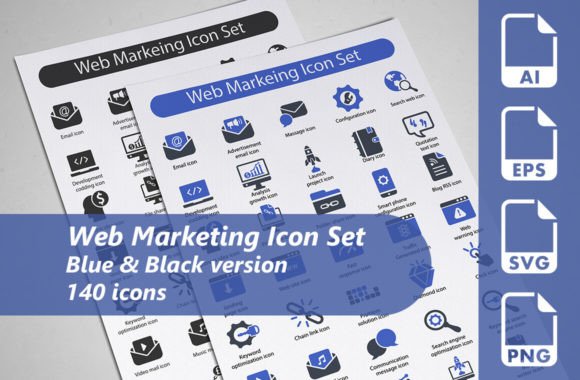
At its core, the Web Marketing Icon Set is a collection of 140 vector icons organized around marketing and web-related themes. The set covers a broad range of concepts commonly needed in digital marketing, advertising, analytics, social media, e-commerce, and general business communication. The value lies not just in the number of icons, but in the thoughtful design and format flexibility that comes with the package.
The set includes two complete versions: one in blue and one in black, effectively giving you 140 icons per color scheme for a total of 280 individual icon files when counting both versions. This color duality is more useful than it might first appear. The blue version works well for modern digital interfaces, branding that relies on cool tones, or projects where you need a professional but approachable look. The black version offers a more neutral, high-contrast option suitable for print, presentations, or any context where color might clash with an existing palette.
Each icon is provided as a fully editable 100% vector AI file, an EPS 10 file, an SVG file, and a transparent PNG. This range of formats means you are unlikely to run into compatibility issues regardless of the software you prefer. Whether you work in Adobe Illustrator, Affinity Designer, Sketch, Figma, or even a free alternative like Inkscape, the vector files remain editable and scalable without quality loss.
Design Quality and Visual Consistency
One of the strongest aspects of the Web Marketing Icon Set is the visual consistency across all 140 icons. Each icon shares a similar stroke weight, corner rounding, and visual density, which is harder to achieve than many designers expect. When you use these icons together on a page, website, or slide deck, they feel like they belong to the same family. This coherence is critical for professional work. Mismatched icons, even if individually attractive, can make a project look disjointed and amateurish.
The icon style leans toward a clean, flat vector aesthetic with subtle detailing. They are not overly minimalist to the point of being ambiguous, nor are they so detailed that they become noisy at small sizes. Each symbol is recognizable at typical interface sizes, around 24 to 64 pixels, and scales cleanly to larger dimensions for print or display use. For example, a shopping cart icon clearly reads as an e-commerce symbol, a megaphone icon instantly suggests promotion or announcement, and a bar graph icon communicates analytics without needing a label.
The choice of blue and black as the two color variants is deliberate. Blue is a common color in marketing and technology contexts because it conveys trust and professionalism. Black offers maximum contrast and works well in monochrome layouts, newspaper-style print, or any design where color printing is not an option. Having both colors available means you can pick the version that best fits your project without having to recolor the icons yourself.
Format Variety and Practical Flexibility
A product is only as useful as its compatibility with your workflow. The Web Marketing Icon Set addresses this by providing four distinct file formats, each suited to different use cases.
The AI files (Adobe Illustrator native format) are fully editable, meaning you can change colors, adjust shapes, resize elements, or combine icons into custom composites. This is the format you want if you plan to modify the icons extensively or integrate them into larger illustration files. The files are organized, and layers are named in a way that makes editing straightforward.
The EPS 10 files offer a widely compatible vector format that opens in almost any vector design application, including older versions of software. If you collaborate with team members who use different tools, EPS files reduce friction.
The SVG files are essential for web and digital use. SVGs are lightweight, scale infinitely, and can be styled with CSS or manipulated with JavaScript. For web developers and front-end designers, having SVG versions means you can embed icons directly into HTML without losing quality or relying on icon fonts. The SVGs in this set are cleanly exported, with well-formed code that works across modern browsers.
The transparent PNG files provide a ready-to-use raster option. While vector formats are preferable for most professional work, PNGs are convenient for quick mockups, drag-and-drop use in tools like Canva or Keynote, or situations where you need to send a file to someone who does not have vector editing software. The PNGs are rendered at a reasonable resolution and include transparency, so they blend seamlessly into most backgrounds.
Who Benefits Most from This Icon Set
The Web Marketing Icon Set is designed for a broad audience, but certain professional groups will find it particularly useful.
Web designers and developers frequently need icons for navigation menus, feature lists, call-to-action sections, and dashboard interfaces. Having a set that includes both SVG and editable vector files streamlines the design-to-development handoff. The blue variant fits naturally into many modern UI color schemes, while the black variant works well for dark mode interfaces or monochrome wireframes.
Digital marketers and content creators produce landing pages, email campaigns, social media graphics, and blog illustrations. Icons help break up text, guide the reader's eye, and reinforce key messages without adding visual clutter. The 140 web marketing icons cover topics like email marketing, SEO, social media platforms (in a generic sense), analytics, conversion, and advertising, which makes them immediately applicable to marketing content.
Print designers and presentation authors benefit from the vector formats that allow scaling to any size without pixelation. Brochures, flyers, posters, and corporate reports often require icons that look crisp at large sizes. The black version is especially useful for one-color print jobs, where maintaining brand consistency with limited ink colors is important.
Freelancers and small business owners who handle their own marketing materials will appreciate the time savings. Instead of searching stock image sites for individual icons that may not match each other, you get a unified collection in one download. The editable vector files also mean you can adapt the icons to match your brand colors, giving your materials a custom look without hiring a designer for every asset.
Educators and trainers who create course materials, slide decks, or infographics about digital marketing concepts will find the set helpful for illustrating complex ideas. Visual aids improve comprehension, and having icons that are consistent in style makes your materials look polished and professional.
Real-World Performance and Practical Considerations
In actual use, the Web Marketing Icon Set performs reliably well. The icons are properly aligned, the curves are smooth, and the exported files open without errors in current versions of Illustrator and other vector editors. The naming conventions within the files are logical, making it easy to locate specific icons even in a large collection.
That said, there are some practical considerations worth noting. The set uses generic representations rather than branded logos. For instance, you will not find specific social media platform logos (Facebook, Twitter, LinkedIn), but rather general social media symbols (speech bubbles, share icons, network nodes). This is actually an advantage if you want to avoid trademark issues or keep your designs platform-agnostic. However, if you need recognizable brand logos, you would need to source those separately.
The icon library is focused specifically on marketing and web-related themes. While 140 icons cover a wide range of topics within that domain, the set does not include general-purpose icons like arrows, basic shapes, or abstract symbols. This is not a limitation if your work is marketing-centered, but it does mean you may need to supplement the set with other icon libraries for non-marketing content.
The two color options (blue and black) are well chosen, but some users may wish for additional color variants or a fully monochrome outline version that can be recolored on the fly. The AI and SVG files do allow recoloring, so this is a minor point rather than a genuine shortcoming. If you are comfortable editing vector files, you can create any color version you need in a few minutes.
Practical Recommendations for Getting the Most Out of the Set
To maximize the value of the Web Marketing Icon Set, consider organizing the files in a way that suits your workflow. Group the blue and black versions separately, or merge them into a single library with color tags. If you work across multiple projects, storing the AI and SVG files in a shared asset folder ensures everyone on your team can access them without duplicating effort.
For web projects, use the SVG files directly and consider setting up a sprite sheet or using an SVG icon component framework to keep your code clean. The transparency of the PNGs also makes them suitable for use in email signatures, where vector formats are not supported.
If you are creating printed materials, stick with the EPS or AI vector formats to maintain crisp lines at print resolution. The black variant is particularly effective for grayscale or single-color print jobs, where color consistency matters.
For presentation decks, the PNG files offer the fastest path to a polished look. Drag and drop onto your slides, and you are done. However, if you need to resize an icon significantly or change its color to match your presentation theme, using the SVG or AI version will give you better results.
Final Thoughts on the Web Marketing Icon Set
The Web Marketing Icon Set delivers exactly what its description promises: a large, well-designed collection of marketing-oriented icons in multiple formats and two color schemes. The quality of the vector artwork is solid, the format variety covers nearly every common use case, and the color options strike a good balance between branding-friendly and neutral. For professionals who regularly create marketing materials, websites, or presentations, this set reduces the friction of sourcing and matching individual icons. It is a practical investment that pays for itself in time saved and consistency gained. If your work involves visual communication around marketing topics, the 140 Web Marketing Icons in this set are worth adding to your design toolkit.