Smart House Icon Set: A Practical Library for Modern Visual Projects
When you're building a website, designing a presentation, or putting together promotional materials for a smart home product or service, the visuals you choose matter. Icons, in particular, are small but mighty. They help users navigate, understand concepts quickly, and add a layer of polish that text alone can't achieve. That's where a well-crafted collection like the Smart House Icon Set comes into play. This isn't just another batch of generic symbols. It's a thoughtfully assembled toolkit designed to meet the demands of real-world projects.
Over the past few years, smart home technology has moved from a niche interest to a mainstream expectation. Whether you're a freelance designer working on a client's landing page, a marketer preparing a product brochure, or a developer adding visual cues to an app interface, having consistent, high-quality icons is essential. The Smart House Icon Set aims to fill that gap with 60 distinct icons that cover a wide range of home automation and living concepts. Let's explore what makes this set useful, where it shines, and how to decide if it fits your next project.
What Is the Smart House Icon Set?
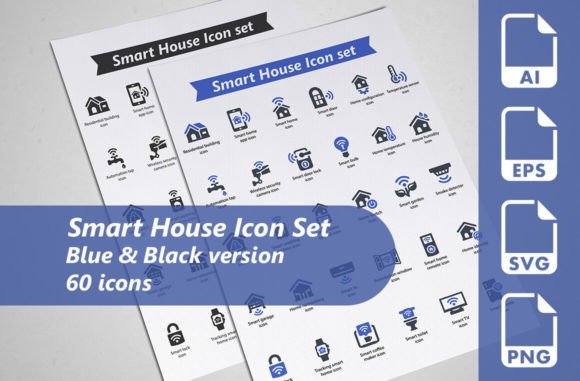
At its core, this is a curated collection of 60 vector icons focused on smart home themes. But the real story is in the details. The set comes in two complete versions: one in blue tones and another in black. That gives you 30 unique icon designs in each color variant, totaling 60 icons overall. This dual-color approach alone adds flexibility, allowing you to choose the palette that best complements your brand or design system without needing to manually recolor each file.
Every icon is provided in multiple formats. You get fully editable Adobe Illustrator AI files, which is a lifesaver when you need to tweak a shape, change a stroke weight, or match a specific brand color. For web and app integration, there are SVG files at 128×128 pixels, and EPS files at 256×256 pixels with the EPS10 standard. Transparent PNGs at 256×256 pixels are also included, ready for quick use in mockups or documents. In short, the Smart House Icon Set is designed to be format-agnostic, so you can plug it into almost any workflow.
Who Benefits Most from This Icon Set?
While anyone can use icons, certain professionals and creators will find this set especially valuable.
Web and UI Designers
If you're building a website for a home automation company, a smart device store, or even a real estate platform focusing on modern homes, these icons can accelerate your design process. The SVG and EPS formats scale cleanly on retina displays and different screen sizes. You can use them for navigation menus, feature highlights, or section headers. The consistent style across all icons helps maintain visual harmony, which is a common challenge when sourcing icons from different collections.
Content Creators and Marketers
Think about how often you create explainer graphics, social media posts, or email newsletters about smart home topics. Having a dedicated set of icons means you don't have to search for clip art or settle for mismatched visuals. Whether you're illustrating a blog post about energy-saving thermostats or a promotional flyer for smart security systems, the Smart House Icon Set gives you the raw materials to build compelling visuals quickly.
Print and Presentation Professionals
Printed materials like brochures, catalogues, and info sheets often require high-resolution assets. The EPS and PNG files in this set are well-suited for print workflows. Similarly, if you're putting together a PowerPoint or Keynote presentation for a conference or client meeting, these icons can make your slides more engaging. Instead of using bland bullet points, you can add a relevant icon next to each key feature, helping your audience grasp the message faster.
Business Owners and Entrepreneurs
If you run a small business in the smart home space, hiring a designer for a full custom icon set might not be in the budget. A ready-made collection like this gives you professional-level assets at a fraction of the cost. You can use them in your product documentation, service menus, or even as part of your branding elements. The editable AI files mean you can adjust colors to match your logo or brand guidelines without needing advanced design skills.
Exploring the Icon Designs and Their Real-World Use
Let's talk about what you'll actually find inside the collection. The 30 icon designs cover a variety of smart home themes. While the exact list isn't specified, typical smart home icon sets include representations of smart lights, thermostats, security cameras, door locks, motion sensors, energy meters, smart speakers, routers, plugs, and home automation hubs. Some sets also include broader lifestyle icons like a house silhouette, a family, or a wifi signal, which are useful for general context.
One of the strengths here is the dual-color versioning. Blue is a common choice for technology and trust-oriented designs, while black offers a more neutral, modern look that works well in minimalist interfaces or dark mode layouts. Having both options means you can use one for light backgrounds and the other for dark themes without additional editing. For example, in a real-world scenario, a designer building a dashboard for a smart home app might use the blue icons on white backgrounds for a clean, approachable feel, and switch to the black set for the dark mode version of the same app.
Another practical use case is in information graphics. Imagine you're creating an infographic that compares energy consumption across different smart home devices. You can use the relevant icons as visual anchors for each data point. Because all icons share a consistent style, the infographic looks coherent and professional. Similarly, for a promotional brochure, you might place an icon next to each product description—like a smart lock icon next to "Keyless Entry" or a thermostat icon next to "Climate Control." These small visual cues help readers scan and retain information.
Strengths and Practical Considerations
No product is perfect, and the Smart House Icon Set has its own set of strengths and limitations. Understanding these helps you evaluate whether it's right for your specific needs.
Strengths
- Format versatility: The inclusion of AI, SVG, EPS, and PNG files means you can use these icons in virtually any design tool or platform. Whether you're working in Figma, Adobe XD, Illustrator, or even Microsoft Office, there's a file format that works.
- Editable vectors: The AI files are fully editable, which is a huge advantage when you need to customize sizes, colors, or shapes. Unlike raster images, vectors retain their quality at any resolution.
- Two color schemes out of the box: Having blue and black versions saves time. You don't have to manually recolor the entire set for different use cases, which is especially helpful in large projects.
- Transparent PNGs: For quick mockups or web use, the transparent PNGs are ready to drop in without additional background removal.
Considerations and Limitations
- Limited to 30 unique designs: While 60 icons sounds like a lot, they are essentially 30 designs in two colors. If your project requires a very broad range of topics, you might find yourself needing additional icons outside this set.
- Specific aesthetic: The style of the icons may not suit every brand. Some designers prefer line icons, others prefer filled or outlined styles. It's important to review the actual designs before purchasing to ensure they align with your visual identity.
- No custom icons: This is a pre-made set, so you don't get bespoke designs tailored to your exact needs. However, the editable AI files allow you to modify existing icons to a certain extent.
How to Evaluate If This Set Fits Your Project
Before you invest in any icon set, ask yourself a few questions. First, what is the scope of your project? If you're working on a small landing page or a short brochure, 30 unique designs may be sufficient. If you're building a comprehensive app with dozens of features, you might need a larger collection or a more specialized set.
Second, consider your color palette. The blue and black versions are a good starting point, but if your brand uses a different primary color—like green, orange, or purple—you'll need to edit the AI files to match. That's doable, but it requires a bit of time and basic Illustrator skills.
Third, think about the style consistency. Look at the sample icons provided with the set. Do they feel modern and clean? Do they match the overall tone of your brand or project? Icons have a personality, and the wrong style can clash with your design.
Finally, consider the formats you actually need. If you're a web designer, SVG and PNG are probably your go-to. If you work in print, EPS and AI are essential. The Smart House Icon Set covers all these bases, which is a strong point in its favor.
Real-World Scenarios Where This Set Shines
Let me paint a few concrete scenarios. Imagine you're a freelance designer hired to create a modern website for a company that installs smart home systems. You need icons for services like "lighting control," "security systems," "climate management," and "entertainment." With this set, you can assign a consistent icon to each service section, making the page visually organized and easy to scan. The blue version could be used for the main content, while the black icons serve as supporting graphics in the footer or sidebar.
Or consider a marketing manager preparing a quarterly report for a smart home product line. Instead of using plain text bullet points, you add an icon next to each key metric. The icons help break up dense information and make the report more engaging for stakeholders. Because the PNG files have transparent backgrounds, they integrate seamlessly into the document.
Another example: an online course creator building a series of tutorials about home automation. Each lesson module could have a featured icon that represents the topic—like a wifi icon for connectivity lessons or a camera icon for security modules. This creates a visual thread throughout the course, helping learners navigate the content.
Final Thoughts
The Smart House Icon Set offers a practical, well-rounded solution for anyone who regularly works with smart home visuals. Its dual-color approach, multiple format support, and editable vector files reduce friction in the design process. While it's not a massive library, the 30 unique designs cover the essentials, and the ability to customize through AI files adds flexibility. For professionals, creators, and business owners alike, this set provides a solid foundation for a wide range of projects—from websites and apps to printed materials and presentations.
If you're looking for icons that are ready to use out of the box, with room to adapt when needed, this collection deserves a spot in your design toolkit. Always review the sample files to see if the style resonates with your vision, and don't hesitate to reach out to the creator if you have questions about specific icons. With the right tools, your smart home projects can communicate clearly, look polished, and save you valuable time.