Evaluating the Design Creativity Icon Set: A Practical Guide for Designers and Developers
When building or refining a digital product, printed piece, or presentation, the visual details often determine how polished and professional the final result feels. Among the many resources available to creators, icon sets occupy a unique space: they need to be consistent, versatile, and expressive enough to communicate ideas quickly. The Design Creativity Icon Set is one such offering that aims to meet these needs across a range of project types. Understanding what it includes, how it works in practice, and where it fits best can help you decide whether it aligns with your workflow and project requirements.
What the Design Creativity Icon Set Includes
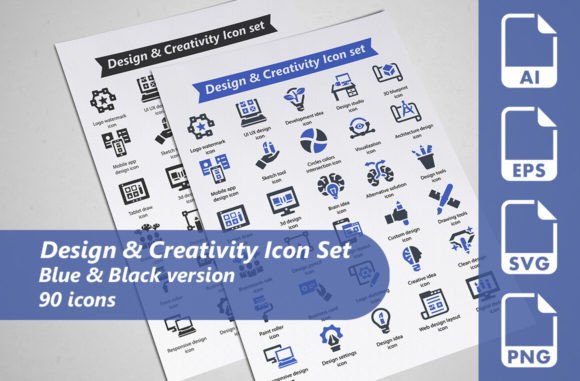
The Design Creativity Icon Set is a collection of 90 vector icons centered on themes related to design, creativity, and visual communication. The set is organized into two versions, each containing 45 icons, for a total of 90 unique symbols. The two color variations are blue and black, giving users a choice between a more vibrant or a more neutral palette depending on the context.
Each icon is provided in multiple file formats to accommodate different design environments and use cases. The package includes fully editable 100 percent vector AI files, which allow you to modify shapes, colors, strokes, and proportions. In addition, you receive SVG files at 128 by 128 pixels, EPS files at 256 by 256 pixels in EPS10 format, and transparent PNG files also at 256 by 256 pixels. This range of formats means the icons can be used in vector editing software, web development workflows, and directly in presentations or documents without additional conversion steps.
Understanding the Structure and Formats
Before evaluating whether this set is right for your project, it helps to consider what each format enables. The AI files are ideal if you work in Adobe Illustrator or a compatible vector application, because they preserve layers, groups, and color swatches, making edits straightforward. The SVG files are well suited for web use, as they scale cleanly across screen sizes and can be styled with CSS or embedded directly into HTML. The EPS files provide a reliable fallback for older software or print workflows that require encapsulated postscript. Finally, the transparent PNG files are convenient for quick placement in mockups, slides, or social media graphics where you do not want to open a vector editor.
This multi-format approach reduces the friction of moving between tools and team members. For example, a developer might prefer SVG for responsive web components, while a graphic designer might work with AI or EPS for a brochure layout. Having all options in one download eliminates the need to convert or re-draw icons, saving time and preserving visual consistency.
Reasons You Might Consider This Icon Set
If you are searching for icons that communicate concepts like innovation, brainstorming, design tools, visual thinking, or creative processes, this set covers a fairly broad thematic range. The icons appear to represent objects and symbols commonly associated with design workflows, such as pencils, brushes, color palettes, lightbulbs, and abstract shapes. This makes them relevant for websites, portfolios, marketing materials, infographics, and educational content where the subject matter relates to creativity or design services.
Another reason to look at this set is the built-in color variation. Having both blue and black versions means you can use the blue icons for a branded or accentuated look and switch to black for situations where color is restricted or where you need high contrast on light backgrounds. This is particularly useful when preparing materials for print where spot colors or grayscale reproduction may be required.
Additionally, the total of 90 icons provides a moderate library that is large enough to cover common design creativity topics without being overwhelming. For many projects, a focused set of this size is easier to browse and select from than a massive collection with hundreds of loosely related symbols.
Benefits and Tradeoffs to Weigh
One clear benefit is the editable vector format. You are not limited to the supplied colors or stroke weights. If your brand uses a specific shade of teal instead of blue, you can adjust the icons in a few clicks. If you need a thinner or thicker line style, that is also possible. This level of control is essential when icons need to match an existing design system or visual language.
The transparent PNG files, while convenient, are limited to 256 by 256 pixels. For most screen use, this resolution is sufficient, but if you plan to print the icons at large sizes, you may notice pixelation. In that case, relying on the vector formats (AI, SVG, or EPS) is the better approach because they scale infinitely without quality loss. The PNG files are best used for digital mockups, web thumbnails, or where quick placement is needed and vector editing is not an option.
Another tradeoff is the number of color versions. While blue and black are versatile choices, the set does not include multiple color palettes or a white version for dark backgrounds. If your design requires icons on dark or colored backgrounds, you may need to invert or recolor the black or blue versions yourself using the vector files. This is straightforward with the AI or SVG files, but it does require a small amount of extra work.
The thematic focus on design creativity is both a strength and a limitation. If your project is specifically about creative processes, design thinking, or artistic tools, this set will serve you well. However, if your content covers broader topics like healthcare, finance, or technology, you may find that many of the icons do not match those domains. In that case, you would need a more general-purpose icon library or a set tailored to your subject matter.
Where This Icon Set Shines
The Design Creativity Icon Set is a strong fit for several common scenarios. If you are building a website or landing page for a design agency, creative studio, or freelance portfolio, these icons can reinforce the visual message that your business is about innovation and visual thinking. They also work nicely in presentation slides for internal brainstorming sessions or client pitches where you want to emphasize the creative process.
For printed materials such as flyers, brochures, or posters that promote design services, workshops, or educational courses, the vector formats ensure crisp output at any print size. The availability of EPS files is particularly useful if you are working with a print vendor that prefers this format for compatibility with older prepress systems.
Infographics that explain design methodologies, creative workflows, or tools of the trade can benefit from these icons as visual anchors. Because the icons are conceptually grouped around creativity, you can maintain a consistent visual theme throughout the infographic without mixing icon styles from different sources.
Another situation where this set fits well is in digital product design, such as in-app icons for a design tool or a creative project management application. The SVG files can be imported directly into design software like Figma, Sketch, or Adobe XD, and the editable AI files allow you to adapt them to your interface's style guidelines.
When Alternatives May Be Worth Considering
Despite its strengths, the Design Creativity Icon Set is not the best fit for every project. If you need a diverse icon library that covers many different industries and concepts, a larger multi-category set would save you from having to combine icons from multiple sources, which can lead to visual inconsistency. For example, if your website covers both creative topics and business operations, you might prefer a set that includes finance, communication, and productivity icons alongside design-related ones.
If your project requires a consistent outline or filled style across all icons, you should verify that this set matches your preferred style. The product description does not detail whether the icons are outlined, filled, or a combination, so if a uniform style is critical to your design system, you may want to examine a preview or sample before purchasing. Some designers prefer sets that offer both outlined and filled variations for the same icons, which this set does not explicitly include.
Another consideration is licensing and usage rights. While the set is described as ready for use in design projects, you should confirm that the license allows commercial use in the way you intend, especially if you are creating templates, themes, or products for resale. This is a general point of diligence for any icon purchase.
If you are working in a team that uses only a specific design tool, such as Sketch or Figma, and does not use Adobe products, the provided AI and EPS files may still be convertible, but native file formats for those tools could be more convenient. In such cases, looking for an icon set offered as a Sketch library or Figma component might save you import steps.
Practical Decision-Making Insights
When evaluating whether the Design Creativity Icon Set aligns with your goals, start by considering the scope of your project. For targeted, creativity-focused materials, this set offers a curated, consistent collection that requires minimal adaptation. For broader projects, factor in the time needed to source additional icons that match the same style if you need to go beyond the creative theme.
Think about the formats that matter most to your workflow. If you primarily work in Adobe Illustrator and need editable vectors, the AI and EPS files are a strong fit. If you are a web developer who prefers SVG for scalability and styling, the included SVG files cover that need. If you rely heavily on PNG for quick placements, be aware of the 256-pixel resolution limit and plan to use the vector files for larger displays or print.
Color flexibility is another practical consideration. Blue and black are safe, professional choices, but if your brand requires a specific accent color, you will need to edit the AI or SVG files. This is a simple task for anyone comfortable with vector software, but if you prefer icons that work out of the box without editing, you may want a set that offers more color options or a neutral monochrome version that can be recolored easily.
Finally, consider the tradeoff between a focused set and a comprehensive library. The Design Creativity Icon Set gives you a coherent, themed collection without extraneous symbols. This can speed up your decision-making because you are browsing a smaller, relevant set. The downside is that you may outgrow it if your content expands into new areas. Balancing these factors against your current and anticipated needs will guide you to the right choice.
Aligning the Icon Set with Your Project Goals
To determine whether this icon set is right for you, start by listing the specific topics or concepts you need to illustrate. If the majority fall under design, creativity, or visual communication, this set is likely a strong match. Next, assess your technical environment. If you use vector editing tools and need multiple output formats, the included AI, SVG, EPS, and PNG files cover most scenarios. Finally, decide how important it is to have icons that work immediately without customization. The blue and black color choices are straightforward, but if you require a different color scheme, plan for a short editing period.
There is no single perfect icon set for every project, but the Design Creativity Icon Set offers a well-structured, format-rich option for those who need visual symbols centered on creative concepts. By understanding its contents, benefits, and limitations, you can make an informed decision that supports your design work without unnecessary friction.