Elevate Your Projects with the City Buildings Set
Visuals are often the first thing your audience notices. A single illustration can communicate a concept faster than a paragraph of text. But here’s the challenge many creators face: finding an illustration pack that is both versatile and reliable. The City Buildings Set offers a polished collection of urban-themed vectors, but knowing how to evaluate and use such a set effectively is what separates a smooth project from a frustrating one. Whether you are building a website, designing an app, or creating marketing materials, avoiding a few common missteps can save you hours of work and ensure a professional result.
Why File Format Knowledge Matters More Than You Think
One of the most frequent oversights, especially among those new to design, is not understanding the difference between raster and vector files. It is easy to download a JPG and assume it will work for everything. A standard JPG is made of pixels. Enlarge it too much, and it becomes blurry or pixelated. This limits its use significantly.
The City Buildings Set provides files in AI, EPS, and JPG formats. This trio is not arbitrary. The AI and EPS files are vectors. They are built on mathematical paths, not pixels. You can scale a single building from the set to fit a large banner or shrink it for a mobile icon without any loss of quality. The included JPG serves well for quick drafts or social media posts, but the real functional power lives in the vector formats. Always prioritize a set that offers layered, editable vector files. This ensures your initial investment remains useful across a wide range of projects and sizes, from business cards to billboards.
The Real Cost of Disorganized Layers
It happens more often than it should. You purchase a template, open it in your software, and find every element crammed onto a single unnamed layer. You want to change the background sky, but you accidentally select the windows of a skyscraper. Simple edits turn into tedious, time-consuming tasks. This is where the internal structure of a file becomes critical.
The City Buildings Set emphasizes a neatly organized file and layer structure. For a busy professional or a small business owner handling their own marketing, this is a game-changer. It means you can locate exactly what you need without hunting through dozens of paths.
A Practical Example of Layer Efficiency
Imagine you are creating an infographic about "Sustainable Urban Development." You need to change the color of the trees from green to a warm autumn palette to match your brand’s seasonal campaign. With a well-structured AI file, you simply locate the "Trees" group layer, apply a new color swatch, and you are finished in seconds. With a disorganized file, you are manually selecting individual leaves for what feels like an eternity. Do not underestimate the value of organized layers. It directly impacts your turnaround time and overall satisfaction with the product.
The Hidden Pitfall of Visual Inconsistency
One of the most common mistakes in design is mixing illustration styles without deliberate intent. A website header might feature a detailed, isometric cityscape, while the app icons on the same page use flat, minimalist line art. The result is a disjointed user experience that feels unprofessional, even if the individual elements are well-made. Consistency is a hallmark of quality design.
What makes the City Buildings Set particularly useful for creators is its focus on perfection in details and consistency. The line weights, the shading, the proportions, and the overall aesthetic are harmonized across all variations. This is incredibly valuable for entrepreneurs, bloggers, and freelancers who may not have a dedicated design team to audit visual consistency. When you purchase this set, you are not just buying individual buildings; you are buying a cohesive visual language that strengthens your brand identity from the start.
Matching the Tool to the Task: Print, Web, and Apps
Another overlooked detail is assuming one file format fits every use case perfectly. Different mediums have different technical requirements.
- Print Projects (Flyers, Posters, Brochures): The AI or EPS files are your primary tools. These vector formats contain the high-resolution data required for crisp, clean printing. You can scale the cityscape to fit a large poster without any degradation.
- Web and Social Media: The included JPG files offer a quick, file-size-friendly option. For website headers or blog graphics, exporting specific elements from the AI file ensures the sharpest possible result for retina screens.
- Apps and Digital Products: Scalability is key here. You can export assets from the AI source at 1x, 2x, and 3x resolutions perfectly, ensuring your interface looks sharp on any device.
The City Buildings Set is designed for versatility. The clean, modern style of the buildings makes them suitable for a tech startup’s landing page, a realtor’s online portfolio, or an urban planning presentation. Before you buy any set, ask yourself: Does the style and file format support my primary output medium? This set provides a solid foundation for nearly any project.
The "Free Download" Equation: Time, Licensing, and Quality
We all appreciate free resources. They are a great way to start learning or experimenting. However, relying solely on free vector collections has hidden costs that many people overlook.
- Licensing Restrictions: Free vectors often come with strict licenses. They may be for non-commercial use only, or they may require attribution. Using such an asset for your business’s logo or a paid client’s app can lead to legal issues.
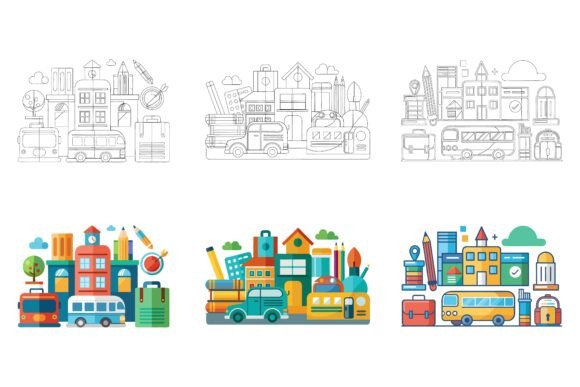
- Limited Variations: A free pack might offer only one or two generic buildings. The City Buildings Set provides 3 variations. This variety allows you to build complex, dynamic scenes without repeating the exact same graphic element, which looks unprofessional.
- Structural Quality: Free files often have broken paths, messy anchors, or inconsistent styling. You spend valuable time fixing the asset rather than using it.
Think about your hourly rate. If you spend two hours hunting for disjointed free graphics, you have already paid more than the cost of a professional, ready-to-use set. Investing in a reliable source saves time and frustration.
What to Verify Before You Buy
Before clicking the purchase button, it is helpful to run a quick mental checklist. This ensures the asset aligns with your workflow and needs.
- Editability: Does it clearly state that colors and elements are easy to modify? (This set specifies you can “change colors and modify the icon so easily.”)
- Cross-Platform Compatibility: Does it work with your operating system? (This set is “Designed for Mac and Windows users.”)
- Complete File Package: Does it include the formats you need? (AI, EPS, and JPG are included here.)
- Intended Use Case: Does the style match your brand or project theme? (Modern architecture illustrations fit a wide range of professional contexts.)
Taking just a few minutes to verify these points prevents a mismatch between your expectations and the final product.
Making the Smart Choice for Your Creative Toolkit
Building a reliable library of design resources takes time and careful selection. The City Buildings Set stands out because it addresses many of the common frustrations designers and creators face. It offers the flexibility of multiple vector formats, the efficiency of organized layers, and the visual credibility of consistent styling. By choosing a well-constructed set, you eliminate guesswork and technical barriers. For creators who value both quality and efficiency, this illustration set provides a dependable foundation for a wide variety of projects. If you are ready to streamline your workflow and ensure your visuals hold up to professional standards, this collection is a practical addition to your toolkit.